





Google primarily reads the text a website contains, so if your website is very image-heavy, it can be difficult for images—despite advances in image recognition—to understand what the site is about.
That’s why it is possible to add what is called an alt tag to an image. This means you tell Google through the code what the image is about.
This can have a beneficial effect on your Google optimization through organic search results.
As seen with Amazon, they use alt tags on their product images.
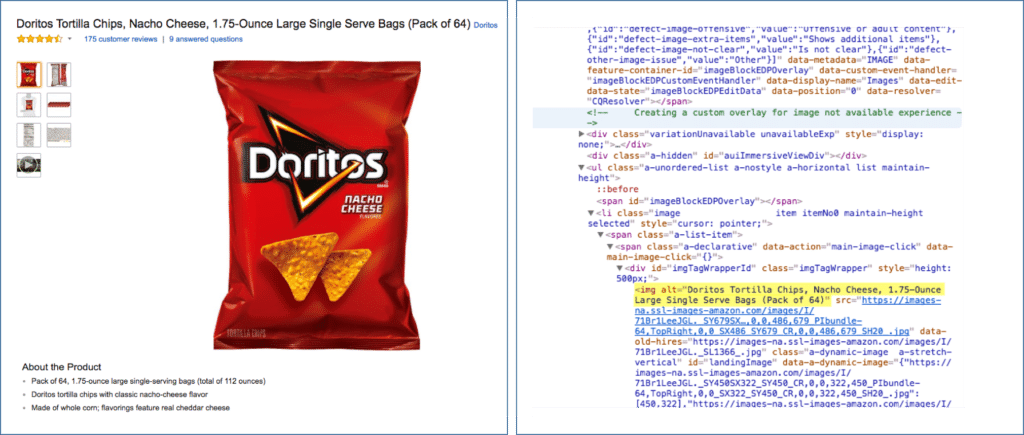
Source: Moz
Besides helping Google understand the page’s content, it also makes it easier to rank in Google’s image search.
This means the images on your site have the chance to appear at the top of Google’s image search results.
Tips for the right alt tag
- Describe the image as precisely as possible.
- Keep the text relatively short and avoid unnecessary adjectives — these are implied when the image is part of a text.
- Use keywords that make sense for the text the image is part of.
- Avoid keyword stuffing, but think about making it possible for Google to understand the image without seeing it.
Let’s do a test — how would you write an alt tag for the image below of me teaching? (Answer below the image)

- Man — poor
- Man teaching — okay
- Man teaching in front of camera — best
As you can see, you can keep it very simple, but you can also spend a bit more time on it.
If you look closely, you’ll also understand why the last one is the best.
It tells Google very concretely what the image is about.
It’s not something that will make the biggest difference between two landing pages, but in the bigger picture, it’s not a bad thing to focus on if you want to check all the boxes for your SEO technical elements.







Comments