




What is Google My Business?
Google Ads, YouTube, Display advertising, Gmail advertising… the possibilities are many – that much we can agree on. And let me add one more to the list: Google My Business.
The advantage of Google My Business is that the “platform” allows you to get far without paying an unreasonably high amount. We can quickly agree that we already spend plenty of money on advertising as it is.
In short, the Google My Business platform has developed significantly in recent years, and not everyone has kept up. “What is Google My Business really?” That’s a question I often get, and I have touched on the platform in a previous post, but today I want to go a little deeper into what Google My Business is and how you can integrate it into your business.
Okay… let’s get started for real!
When you search on Google, you’ll see different results appear. Surprise! You’ll also come across the classic Google ads, which are displayed first. Then there are the Google Shopping results, usually on the right-hand side. But often, this image also appears.
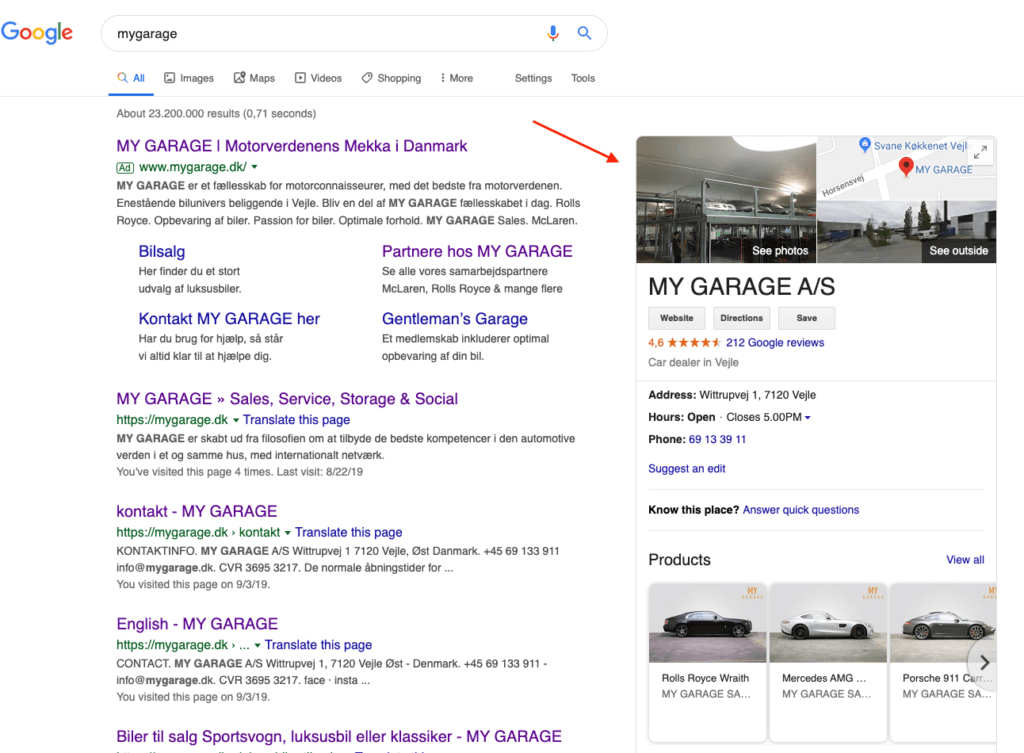
This image is “part of” Google My Business, and it basically shows an address, contact details, photos, videos, opening hours, and much more.
This image ensures significant visibility in the search results, something many businesses strive for. After all, who wouldn’t want to be more visible on Google?
Create a free profile on Google My Business
Who needs Google My Business?
At first, Google My Business was somewhat hidden, mainly used by local shops, restaurants, and similar businesses. But today, the platform is widely used by online businesses, and there are now a range of analytics tools and integrations, making the platform even more valuable. We’ll get back to this later.
In short: all companies can, in one way or another, benefit from Google My Business – it’s not only physical locations that should focus on the platform.
Credibility through Google My Business
Let’s face it! The internet keeps growing, and things are moving fast! Can we keep up? One of the biggest challenges in online marketing today is creating credibility, because people encounter a lot of negative experiences online – just like in real life when visiting a hairdresser or bakery.
Internet users review everything, just like bakery customers spread the word if they had a bad experience. The difference is, online it spreads much faster.
Trustpilot has for many years been the go-to place for reviews, but now Google is entering the competition; they also want their share of the pie.
… And that’s why I strongly believe you should be on the platform too.
Setup: how to get started
The first step is to go to Google My Business and create a new company profile. You’ll go through a few steps.
Towards the end, you’ll be asked to verify. This is Google’s way of making sure you are who you claim to be. Security and credibility are key priorities – remember that.
Often Google will send you a physical letter (yes, those still exist). It may take up to 14 days to arrive in your mailbox. You’ll then enter the code you receive into Google My Business, and from there you’re up and running. Now you own your location and have control.
But full control naturally also comes with some work. Are you ready to create a great Google My Business profile that ultimately attracts more customers to your brand?
Most of us know the classic Greek restaurant with way too many dishes on the menu. The pictures aren’t exactly appealing, and you end up disappointed when you order crispy fries but get soggy fries that are neither crispy nor salted (I hate when that happens!).
This disappointment is similar to businesses that haven’t optimized their Google My Business profile. You’re not the only one controlling what gets uploaded; customers can upload photos from their last visit, and these aren’t always flattering. In other words, you don’t control how your business appears on Google if you don’t take charge.
Business information and description
The first thing you should do is add basic information about your business. Remember, Google My Business is often the first place users engage with your company. If this part isn’t accurate, you could quickly receive negative reviews.
Example: Imagine you want to eat at a restaurant. You Google it, and it says the opening hours are 5–10 pm. But when you arrive… it’s closed that day.
Filling out information on Google My Business is fairly easy, but not everyone does it correctly or keeps it updated.
Start with a description of your business. This could be a short introduction: Who are you? Why did you start the company? What are your core products?
You can write up to 750 words. Make it engaging, include your core services, and ensure it’s “digestible” so people actually want to read it.
Contact information
As mentioned earlier, contact details are a game changer. Just like opening hours, it’s crucial that your contact information works. The phone number you add should be one you can actually be reached on. Otherwise, it creates frustration.
Photos on Google My Business
You can upload photos to Google My Business in different categories.

Tips for your photos
- Format: JPG or PNG
- Size: between 10 kb and 5 MB
- Recommended size: 720 x 720 px
- Minimum size: 250 x 250 px
- Quality: The photo must be clear, no filters, and an accurate representation of your business
Tip: Make sure the photos reflect different areas of your business. Don’t upload irrelevant images. This is the first impression for potential customers.
Videos on Google My Business
Just like with photos, you can also upload videos from your business, which I highly recommend.
Tips for your videos
- Length: up to 30 seconds
- Size: up to 100 MB
- Resolution: 720p or higher
Tip: Use a video that shows your business at its best. A walkthrough tour with a GoPro is a great idea. So is showing how your products are made or an employee interview. In other words: create material that builds credibility with potential customers.
Products on Google My Business
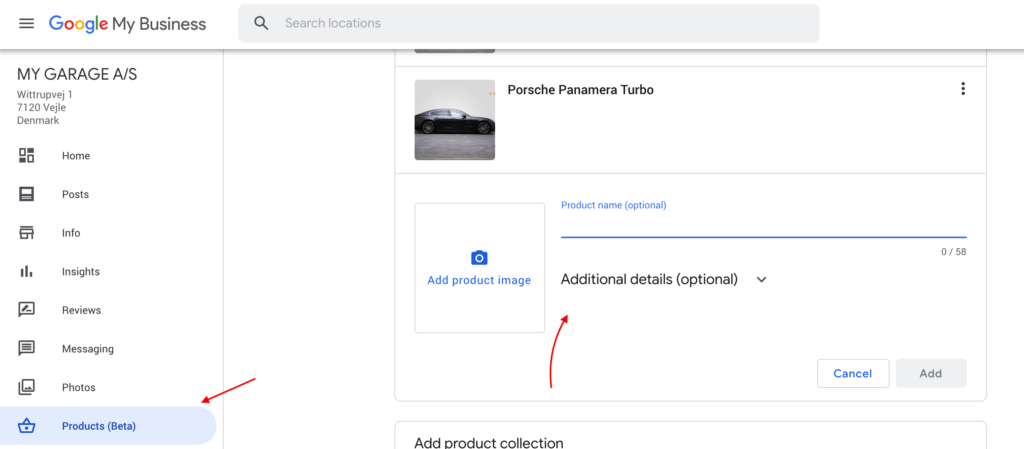
As shown below, I have added products for MyGarage on their Google My Business. This way, people get a good first impression before visiting the website.
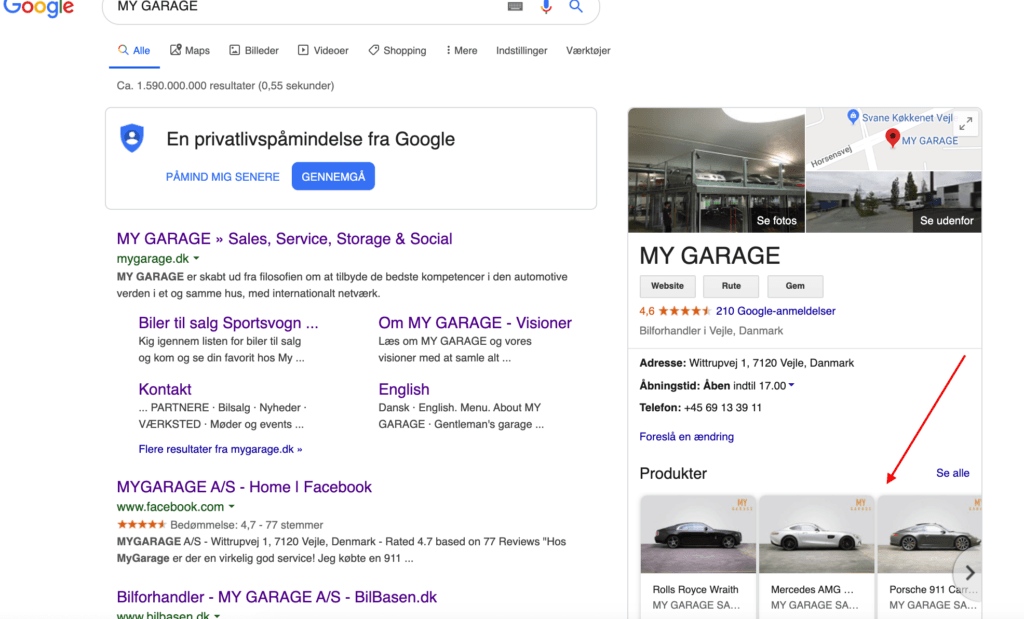
You don’t need to sell cars to benefit from this function; you can add all kinds of products. It’s straightforward and can be found under “products” in the Google My Business menu.
Marketing on Google My Business
The whole idea behind Google My Business is, of course, to create more visibility around your business. Besides being a great showcase, it also offers excellent opportunities to use data and marketing features built into the platform.
Reviews
Reviews play a major role in online purchasing decisions. You know it from Trustpilot, Amazon, Facebook, etc. People can leave reviews on your Google My Business whether you like it or not. Google wants to make the digital world more transparent, much like Trustpilot does.
Read more about the effect of reviews on online shopping here.
Tip: Always respond to your reviews on Google My Business. This shows potential customers you are active and willing to help. Of course, when the number of reviews increases, it may not always be possible resource-wise.
Handling negative reviews – without drama
A bad review hurts, but it doesn’t have to be a problem. A professional, open response can actually strengthen your credibility. Take it seriously, respond calmly, and show customers you listen and resolve issues.
Here’s a simple template:
“Thank you for taking the time to give feedback. We’re sorry you had that experience. It’s not the standard we aim for. Could you please email us at [your email], so we can find a solution?”
Avoid arguing publicly – and always respond, even if the review feels unfair. It signals responsibility and respect.
Connection with Google Ads
Since Google owns Google My Business, there is naturally also a connection to Google Ads – what we used to call Google Adwords. What you need to do is link your accounts in your Google Ads account with your Google My Business account. That way, you can use your location as part of your ads.
Instead of giving you 200 screenshots, I have found Google’s own free academy video that explains how to connect the two platforms.
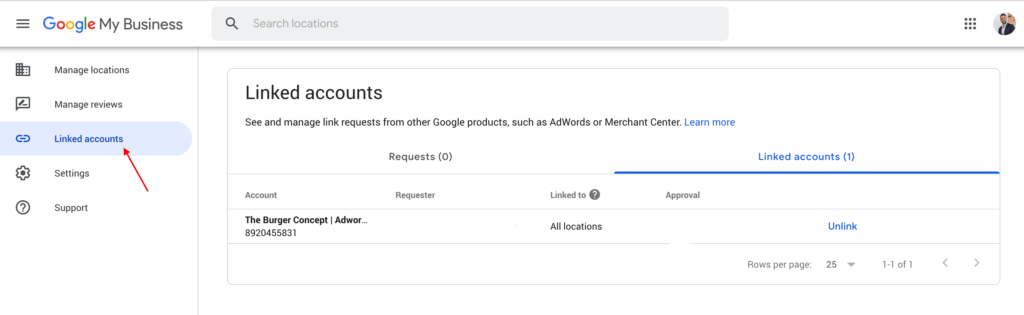
Afterward, you can go into your Google My Business and select “linked accounts” on the left side, and from there you can see which accounts are connected.
As you can see below, my Google Ads is connected with The Burger Concept
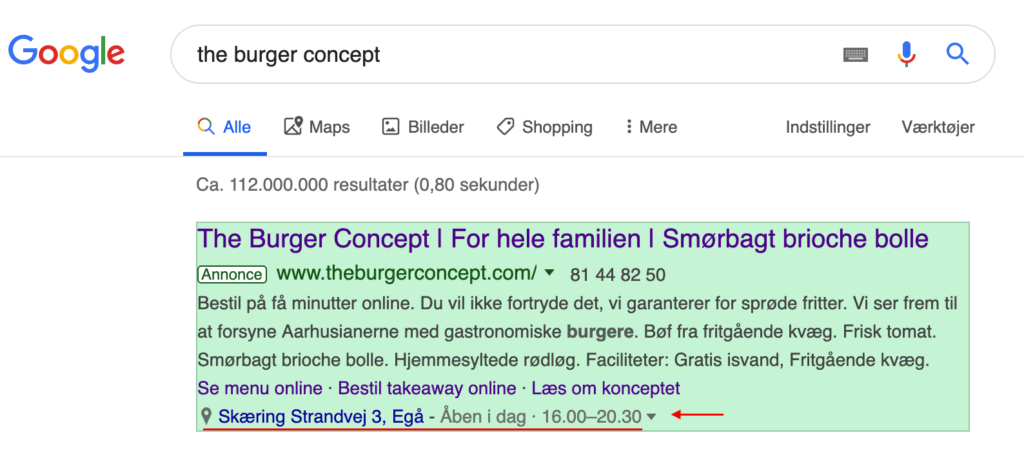
Once you have linked the platforms, you can use location-based extensions in Google Ads.
This means that you will get the nearest address depending on where people are searching from, and at the same time, you will also have the option to display your phone number and opening hours.
You can see another example of this from The Burger Concept.
Posts on your profile
Another feature is posting updates on your Google My Business page, much like you would on LinkedIn or Facebook.
It’s not the most visited place, but if you’re already sharing content elsewhere, you might as well post it here too. It adds visibility in Google, and it certainly doesn’t hurt your SEO.

Google Posts – be visible with current news
A frequently overlooked feature in Google My Business is Posts. These are small updates you can publish directly to your GMB profile – a bit like updates on social media. They appear in search results and allow you to share:
- News and blog posts
- Campaigns and offers
- Events or activities
- Important changes in opening hours, services, or contact info
Use Google Posts to keep your profile active and relevant. A dead profile can look neglected, while an active profile signals that your business is thriving. Keep the text short and precise, and always add an image or graphic that grabs attention.
Insights
One of the things I love about marketing is data – and that probably doesn’t come as a surprise.
As always, Google does an excellent job of giving us as much data as possible that we can use to improve our businesses.
They do this via Google My Business as well.
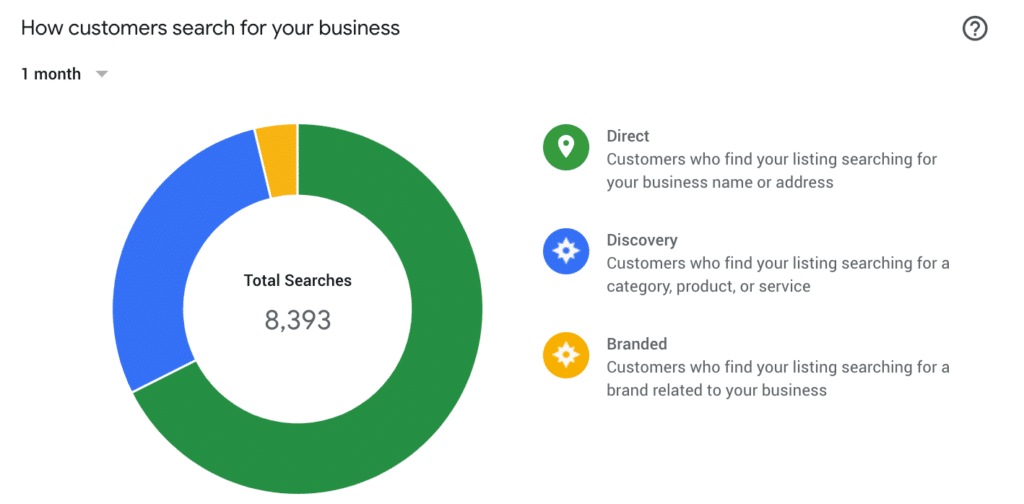
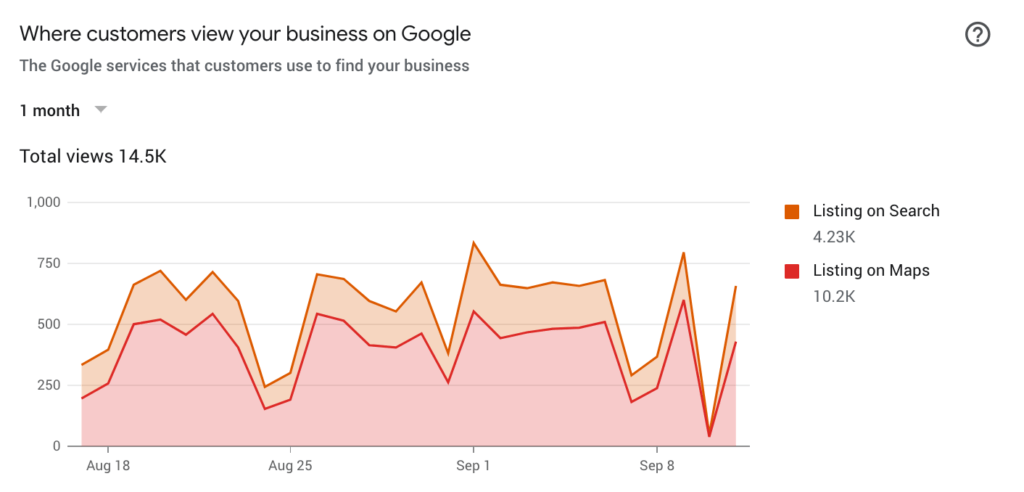
The data below is taken from different accounts, but it shows how their analytics tool works.
Let’s dive into the different data areas that Google provides:
- Searches users have made to find your business
- How people find your business through searches
- Direct searches for your business or address
- Users searching for industries or services similar to yours
- Users searching for brands similar to yours
- Where users found your business on Google – Maps or Search.
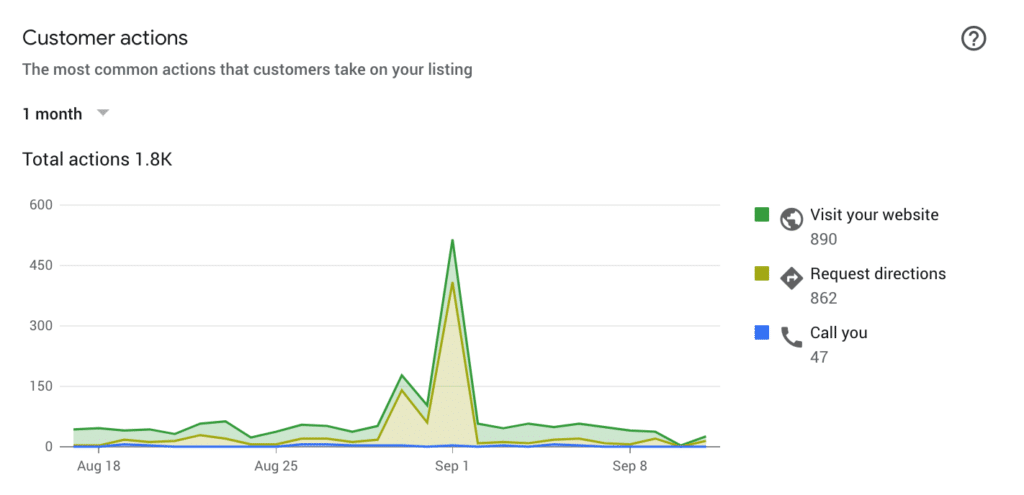
- User actions on your results in Google
- Number of website visits
- Number of location downloads
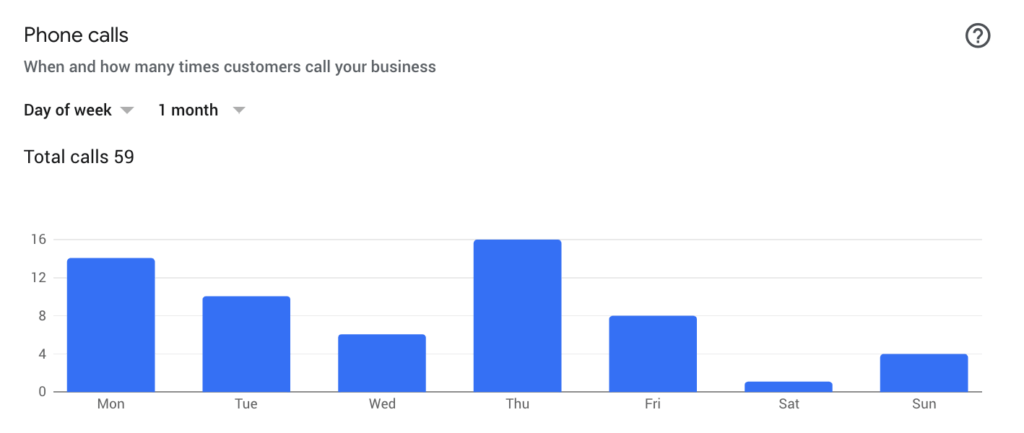
- Number of direct calls from your Google My Business listing
- Number of phone calls per week.
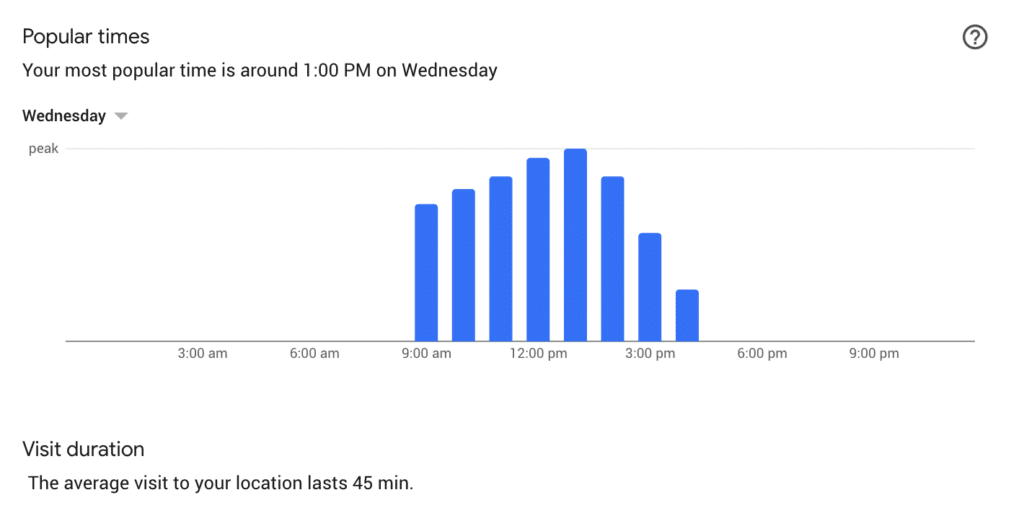
- Overview of the most popular times for visits.
- Overview of interactions with images on your profile.
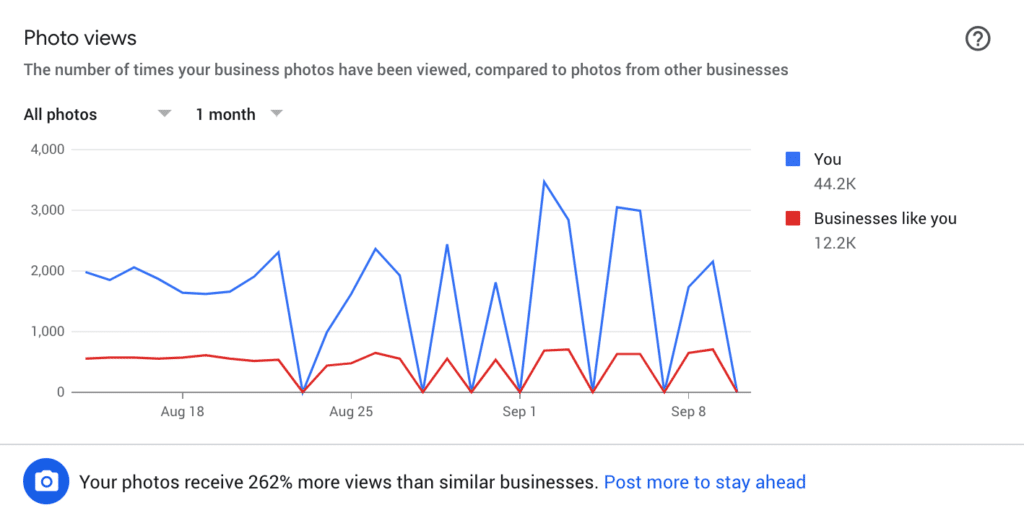
All of this data can be actively used in your business. You can see which keywords people find you with. In other words: these are words you can use in your Google Ads or SEO. One thing I often look at is how the businesses I work with develop from quarter to quarter.
Are we getting more views on our images? More phone calls? More location views? This way I can see whether we are improving or whether we need to adjust some of our marketing efforts.
Tracking and measurement – find out what works
Google My Business gives you access to a dashboard with statistics: how many have seen your profile, clicked on “call,” requested directions, or clicked to your website. But you can take it a step further.
Use UTM parameters in your link to your website, so you can track the traffic in Google Analytics as for example “gmb” under channel or campaign. Example:
https://dinside.dk/?utm_source=gmb&utm_medium=organic&utm_campaign=profilbesøg
This way, you can measure exactly how many visits GMB actually drives – and what behavior those users have afterward. This is especially useful if you use GMB as a lead driver, for example for clinics, contractors, or consultants.
Multiple locations? How to manage them
Do you have multiple stores, clinics, or offices? Then each address needs its own Google My Business profile. You can create and manage them collectively via a “Business Group” or “Location Group.”
This makes it easier to manage everything in one place and ensures that each location has its own opening hours, images, and reviews. Important: make sure names and addresses match exactly with your website and any official business registration.
Tip: You can use a tool like Yext to manage multiple locations across Google and other platforms at the same time. This saves time and minimizes errors.
Reviews and trust will be crucial in future searches
We are entering a new era where it is no longer only Google that decides who appears at the top. With the rise of LLMs (Large Language Models) such as ChatGPT, Perplexity and AI-driven search results, trust plays a bigger and more decisive role than ever before.
These models draw on everything from websites to reviews, social media, and third-party data to decide who they “recommend” or cite as authority. This means your reviews, mentions, and online credibility are no longer just important for customers – but also for the algorithms shaping future visibility.
So what does that mean for you?
Whether you run a local hair salon, a specialized clinic, or a larger B2B company, it is essential that you actively work on building and maintaining your online trust:
- Collect reviews continuously – not just once and forget about it
- Reply to reviews – both good and bad
- Use testimonials and trust icons strategically on your website
- Make sure business profiles across platforms are consistent
The companies that take trust seriously will be the strongest – not only in front of potential customers but also in the ecosystems where AI makes decisions on behalf of users. It starts with your Google profile. It starts with your reviews. And it starts now.
Conclusion
Phew! Still with me? I hope so! We are finally at the end of this post, and I really hope you got something out of reading it.
I apologize if it became a little data-heavy toward the end, but there are so many opportunities to use Google My Business actively to create even better visibility on Google. Combine it with your Google Ads, and suddenly you have a marketing engine.
Another feature worth considering in Google My Business is the messaging function. However, I would never recommend starting more communication channels than you have the resources to manage.
Make sure to keep your Google My Business updated so that existing and potential customers get the best possible first impression.
Download the Official Google My Business App and manage your profile from there.








Comments