




Getting traffic to your website with Facebook advertising is easy! But getting high-quality traffic is a different story – and especially the type of traffic that converts to sales is much harder to get.
I’ll be the first to admit that I have spent – and sometimes wasted – a lot of money a lot of money on Facebook advertising. They’ve been expensive but necessary lessons – especially when, like me, you have worked with Facebook advertising for 13 years. Recently, Facebook decided to simplify things by merging Power Editor and Facebook Ads Manager. So if you come across the term “Power Editor” in this post, it is now the same as the Ads Manager, and there are no longer two separate systems for advertising via Facebook.
This article is for anyone who needs help with Facebook advertising, want to know more about it, or are considering using an agency to manage their account.
Ready to get started?
1. What is Facebook advertising?
Facebook advertising consists of the ads that blend in with other posts. This applies across all placements, whether under videos, in feeds, on Instagram, or in stories. Facebook is continuously increasing the number of places where we find their ads, both by acquiring platforms like Instagram and WhatsApp, and through partnerships with third parties.
The word ‘advertising’ inherently means paid ad space that businesses or individuals pay to use. Advertising on social media allows these platforms to earn revenue instead of charging a monthly subscription like Netflix or Spotify.
How much does Facebook advertising cost?
I have spent millions on Facebook, but it is not necessary, and often impossible, to start with such a high budget. Typically, you’d start with a much lower budget and test what works and what doesn’t. Therefore, there’s no fixed answer. The great thing about this type of advertising is that you can start with a relatively low budget and, as mentioned earlier, see what works.
Also, remember that many factors influence whether your advertising works. Do you have the right product? The right website? The right price for your products? In other words, there are many factors that influence performance. So be careful not to dismiss Facebook and say it doesn’t work; I’ve seen that often, and it’s usually other factors that have caused the advertising to fail.
Usually, most people start by testing advertising on social media themselves, but as budgets grow, it often becomes a better business decision to outsource this task to relevant partners.
What is a Facebook Pixel?
Throughout this guide, you will see me mention “Facebook Pixel” several times. It sounds fancy, but it’s basically just a small piece of code that you either insert via Google Tag Manager or install directly into the code yourself. Once this piece of code is installed, Facebook can track user behavior on your website.
This allows you to use this behavior (not at an individual level) but through statistics in your audience segmentation. In this way, you can, for example, exclude people who have purchased before, create audiences based on people who have visited certain products, and much more.
All of this, and much more, will be covered in this guide. Enjoy!
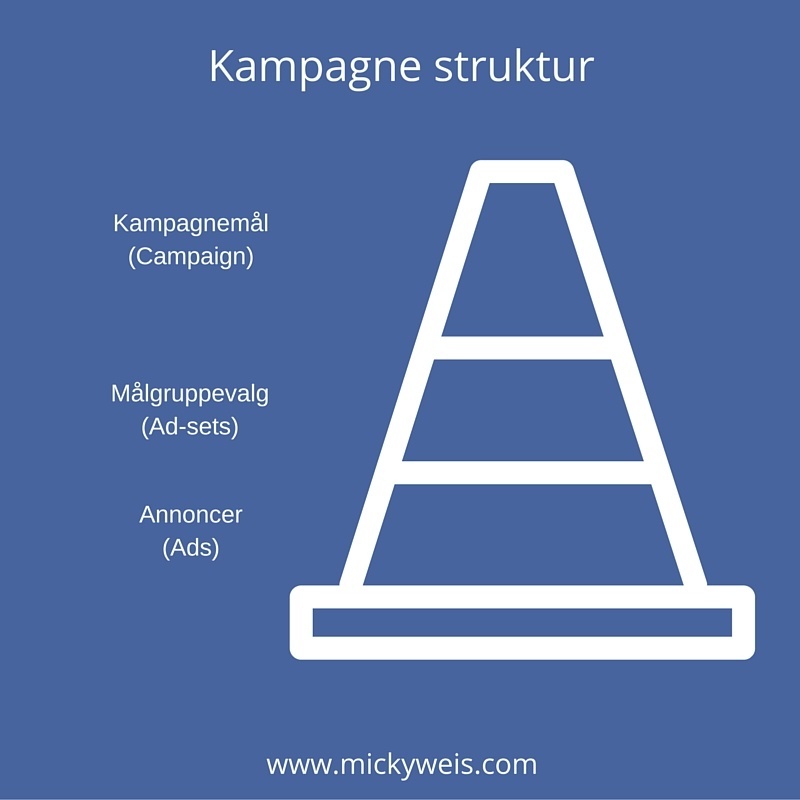
The first thing you need to understand when setting up ads via Facebook is your ad structure. If you manage to create a good structure, you’ll automatically have a better chance of better results – and without a good structure, it can quickly become overwhelming.
2. Facebook audiences
Now it’s important that you pay close attention! Where most people go wrong with Facebook advertising is when it comes to setting up audiences. Facebook, for better or worse, has a vast amount of data, and with this data, you can target a very specific audience, but you also risk casting too wide a net.
I usually work with these three audiences: Website visitors, email lists, and fans. However, these can be divided into smaller sub-audiences for further segmentation. This form of segmentation can be used whether you run a webshop, a blog, or if you simply want engagement in a giveaway or contest on your timeline.
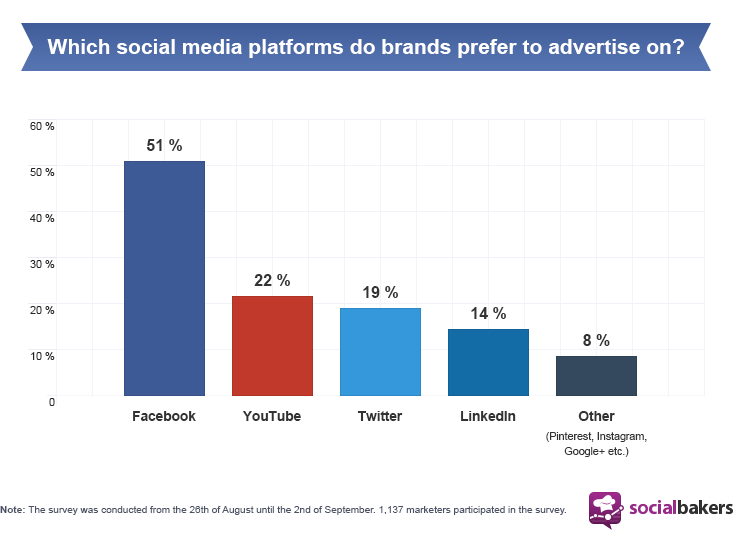
Competition is increasing on Facebook!
Facebook audiences for sales
The most important factor for most businesses is still to sell via Facebook advertising – or to generate quality traffic that later converts into sales. Here are my three best-performing audiences.
- Visitors
- Email list
- Fans
Facebook audiences for likes
In my view, one of the most misunderstood elements on Facebook is the value of ‘likes’. Most businesses – big and small – have a goal of reaching a certain number of likes, but I focus on quality instead as the overall goal.
And this goal – to get quality likes – is what I always work from. With the following audiences, you will have a better chance of increasing the number of quality likes on your page. These types of likes can be more expensive and harder to obtain, but they are definitely worth the effort:
- Visitors to your website (excluding current fans)
- Lookalike (excluding current fans)
- Interest-based (excluding current fans)
Visitors via Facebook Pixel
To segment against your visitors, you need to install a code on your website. Facebook refers to this as WCA (Website Custom Audiences). This code allows you to create customized audiences based on your website’s traffic.
Start by opening your audience manager.
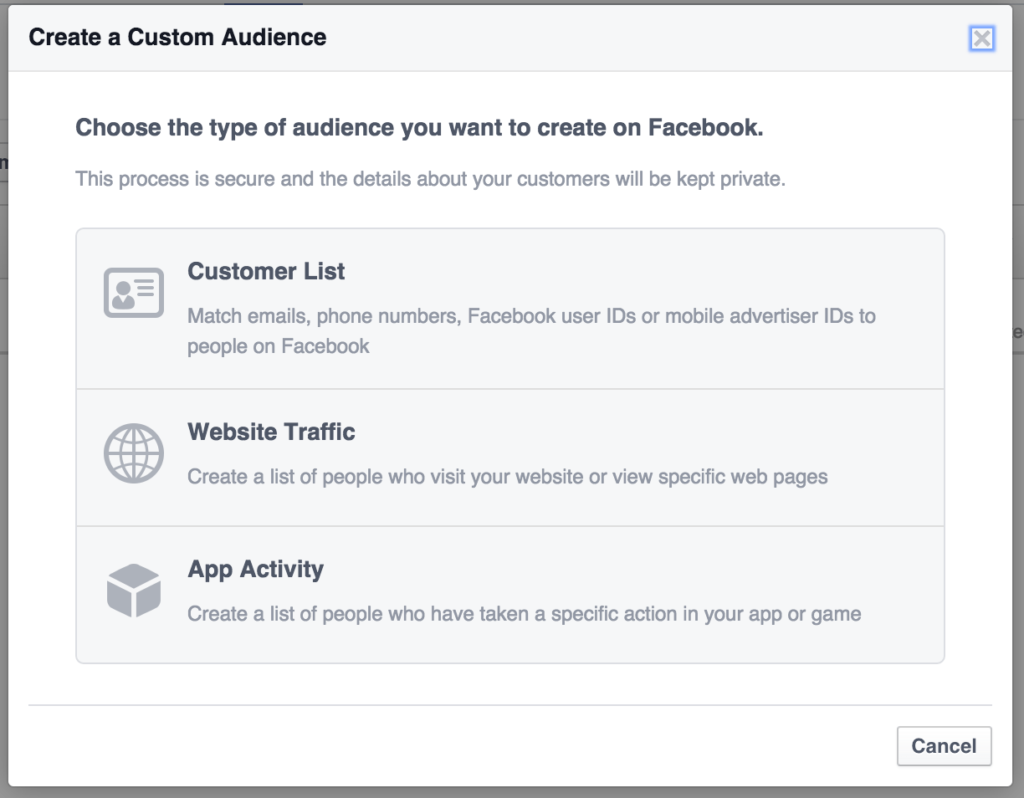
Then create a new audience and choose custom audience > website traffic, as shown below.
Afterward, you need to set up some rules and guidelines for your audience. You can, for example, set guidelines for which URLs you want people to have visited, and conversely, you can also set guidelines for which pages they should not have visited.
It can also be interesting to test exact day intervals. If it is a webshop, it may be beneficial to market to those who have visited the website within the last 24 hours and who have not completed their order.
Here is an example of people who have visited a website but have not visited the “thank you for your order” page, so they have not completed an order.
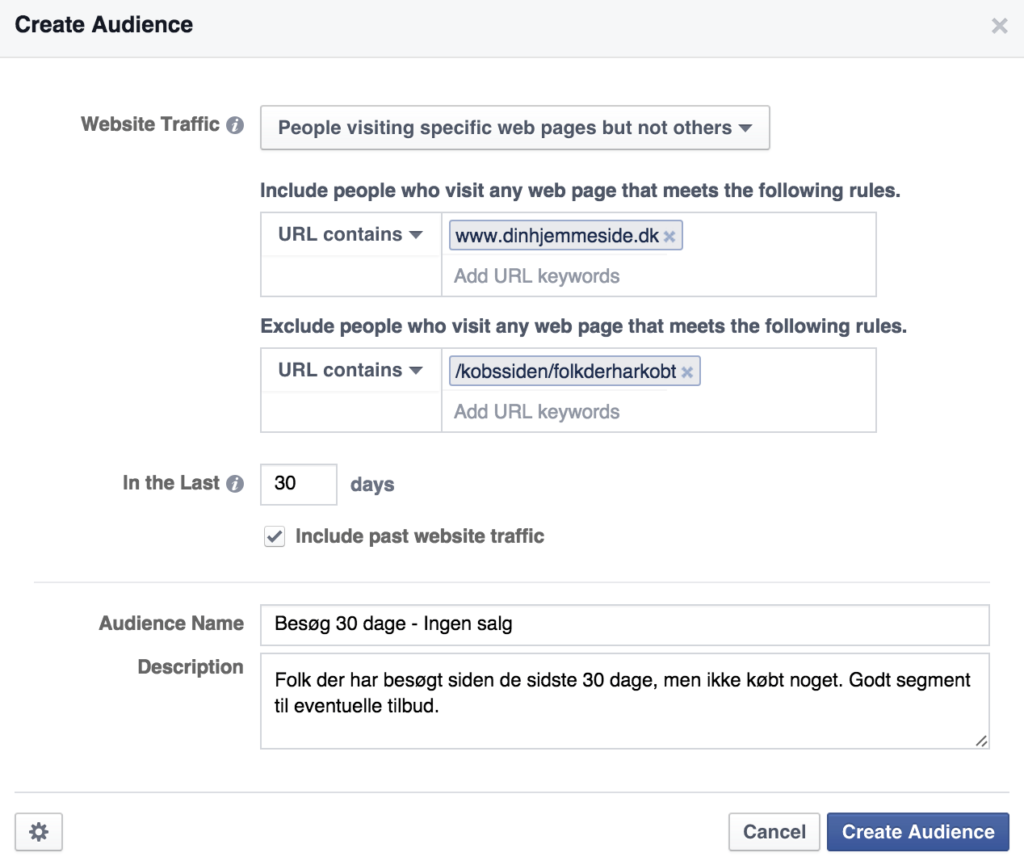
If the Facebook pixel code is installed correctly on your website, Facebook will begin to compare their data with your visitors. This means that you can market to visitors to your website via Facebook – a very powerful strategy in terms of quality.
Example of this (260,000) from Slikhaar

Going back to ad sets, we can now select the audience called “all visitors.”
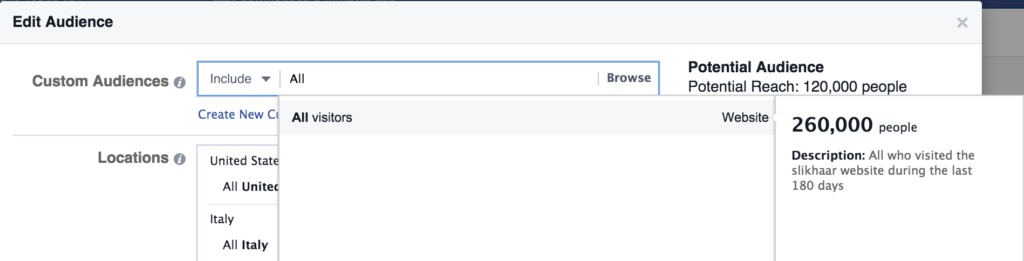
Pretty cool tool, right?
You can, of course, further segment your audience if you want to, for example, divide your visitors based on geographical variables. It can be beneficial to split your target groups by country to make it easier to track sales and cost per sale.
e-mail list
Advertising to your e-mail list works similarly to targeting visitors. Let’s assume you have a blog or a webshop. Then you most likely also have an e-mail list – also called a newsletter. You can actively use this list of e-mails on Facebook.
Let’s look at the audience again. This time, choose the first option of the three; namely customer list.

Next, you’ll need to choose how to upload your email list. Typically, you’d select an exported file from your website containing email addresses and then upload it to Facebook. So, select “Upload a file”.
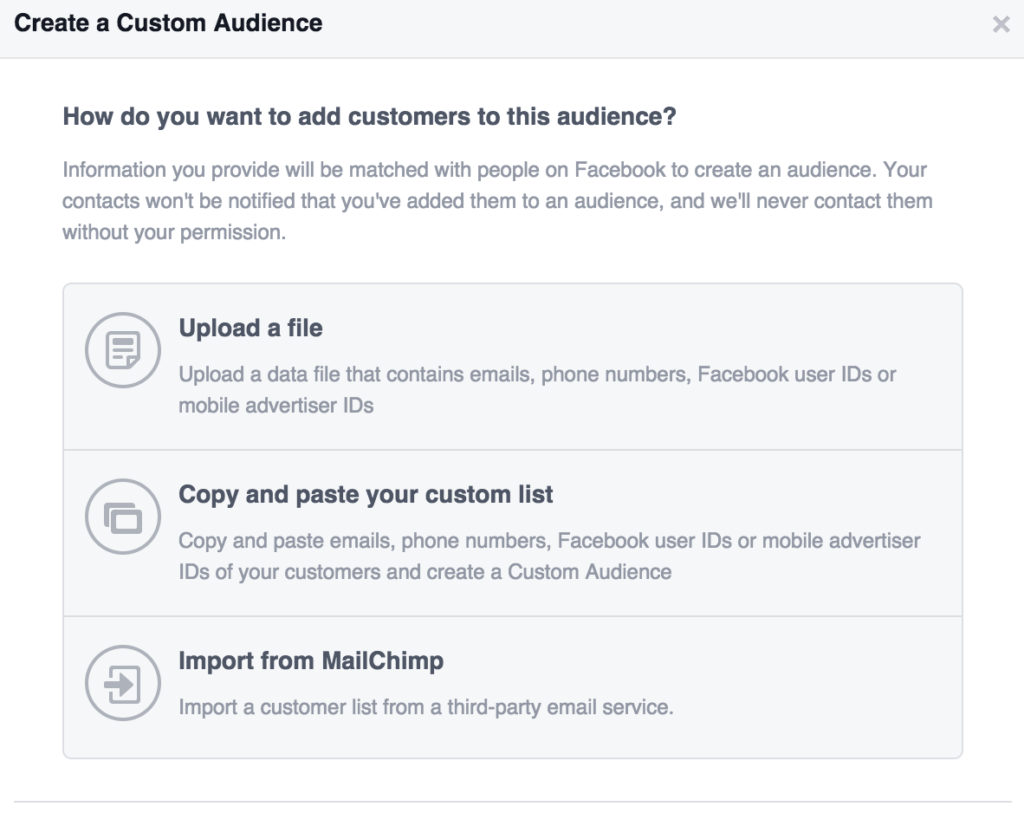
Once you’ve uploaded your file, Facebook will compare the e-mails with users on Facebook. Often, people have used the same e-mail on your webshop and on Facebook, and in this way, you create an audience.

Here, you can see that Slikhaar has done exactly this. However, we forgot to note that this is only American customers. We want to keep it country-based since the countries are divided by their own domains, and this also makes it easier to market to the right segments.
Below is how it can be done in practice. Also, remember to exclude the audience we created before, so your audiences don’t overlap, giving you the best data.
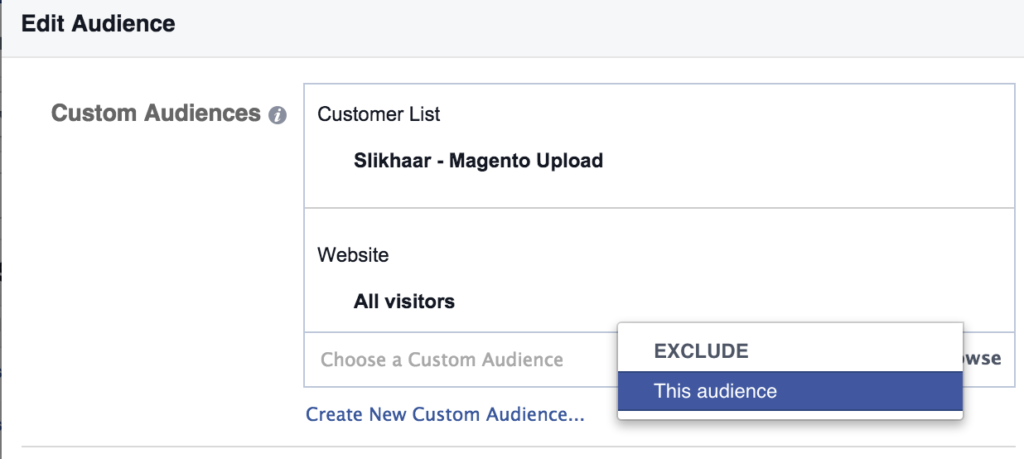
Fans
Targeting fans is relatively simple. You can do this directly under ad sets, which is very easy, and this also means you don’t need to create it as an audience.
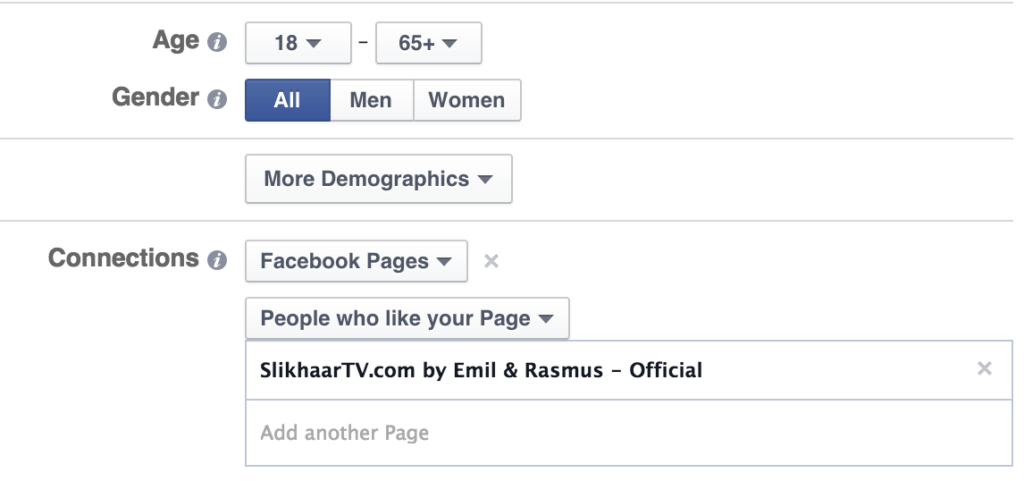
You can, of course, also create different ad sets (target groups) for each country. This means you have one ad set for fans in the USA and another for fans in the United Kingdom. Often, your target groups are closely related to your landing pages, which we will look at in more detail shortly.
Look-a-like audiences
You might be thinking: “What if I don’t have many visitors or particularly many fans?” Instead of guessing, you can actually use the above methods even if you don’t have much data.
Facebook has created a tool called “look-a-like audience,” which means Facebook finds people who are similar to the data you already have. For example, if you have 1,000 visitors to your website per month, you can ask Facebook to find the top 1% in a country that resembles those 1,000 visitors – based on their Facebook data.
Let’s take Slikhaar again – if we choose a source for the look-a-like.
We then choose “All visitors,” and then you can choose the top 1% in the USA that resemble them.
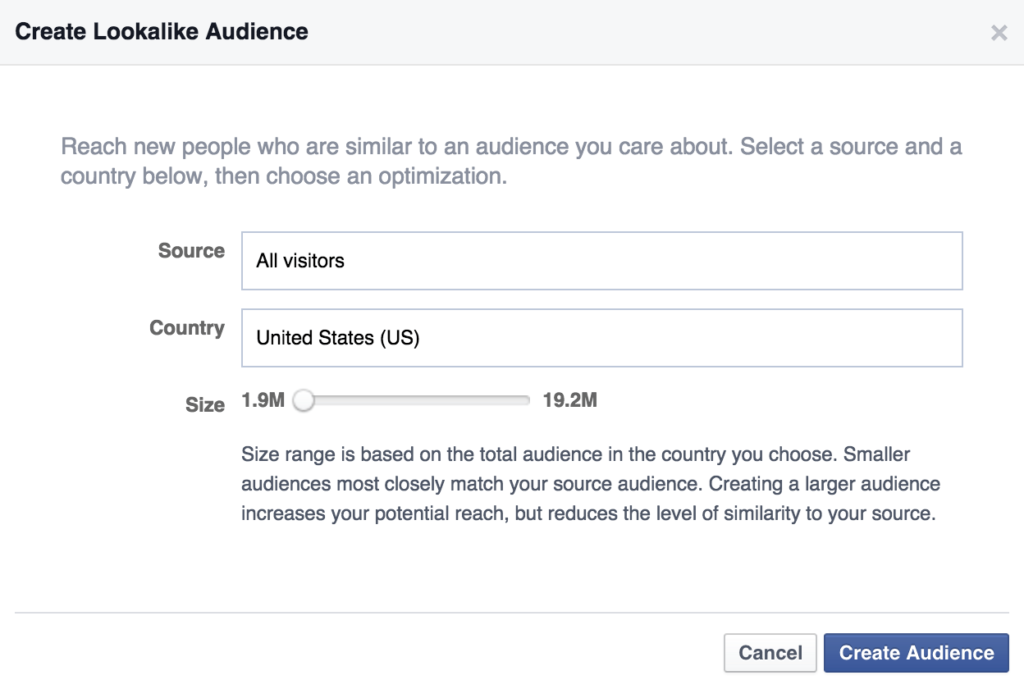
A very important element in look-a-like audience is to be mindful of the data you provide to Facebook. Slikhaar has many visitors due to 1,000,000 subscribers on YouTube.
However, not all these visitors are quality visitors when we think about sales – therefore, it’s more worthwhile for Slikhaar to use their customer list if the goal is sales. So, think quality, not quantity, when feeding Facebook data.
Here is a look-a-like audience for Slikhaar based in the United Kingdom

We can again choose this target group under ad sets, and we can further segment it. I often test a complete look-a-like, and then I create another segment where I use a few more segmentation details.
This could be age and gender. Remember that Facebook compares all people on their platform – it may be that, like Slikhaar, you only want to market to a more niche-based group.
Interests (interest-based)
The last element we will look at within audience segmentation is interest-based audiences. In my view, these can be risky because people tend to have many different interests on Facebook. For example, one person can have many interests on Facebook – both big and small – because you cannot segment by how strong the interest is.
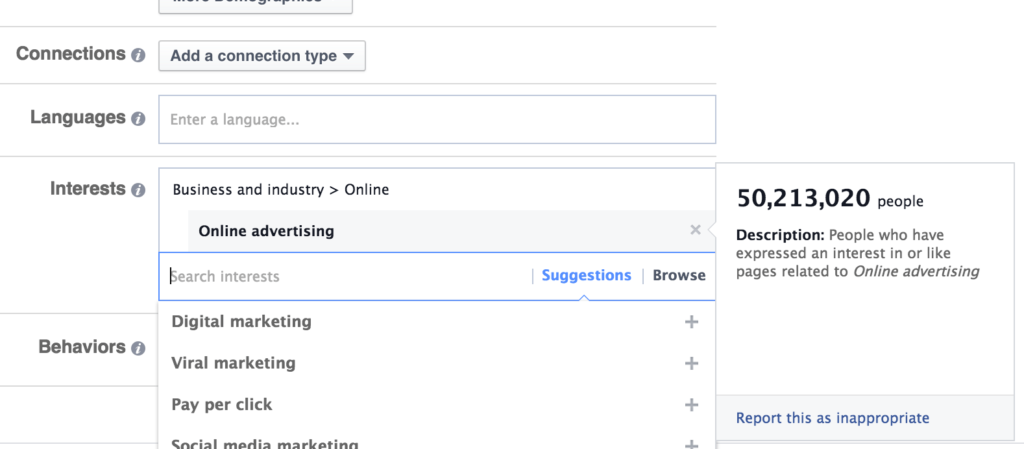
As seen above, the target group “online advertising” is really broad – and note the text in the box.
“People who have expressed an interest in or like pages related to Online advertising”
This means you’re targeting a very, very broad audience. Therefore, I recommend choosing very specific target groups if you want to work with interest-based segmentation.
Facebook Method
Facebook’s Search can be used to easily find competitors – which is much easier than browsing manually.
Let’s take the two largest marketers internationally
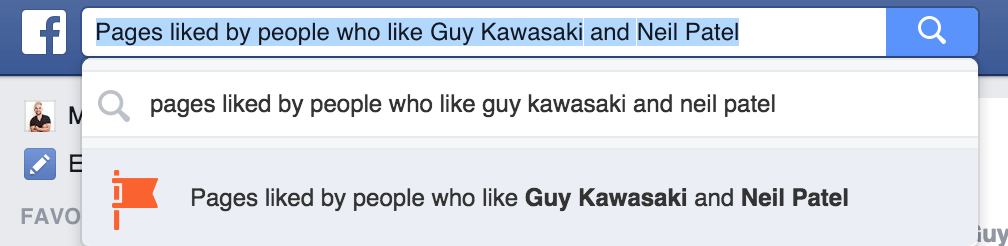
And afterward, you’ll get a series of pages that this segment also likes. A bit nerdy, but pretty cool!
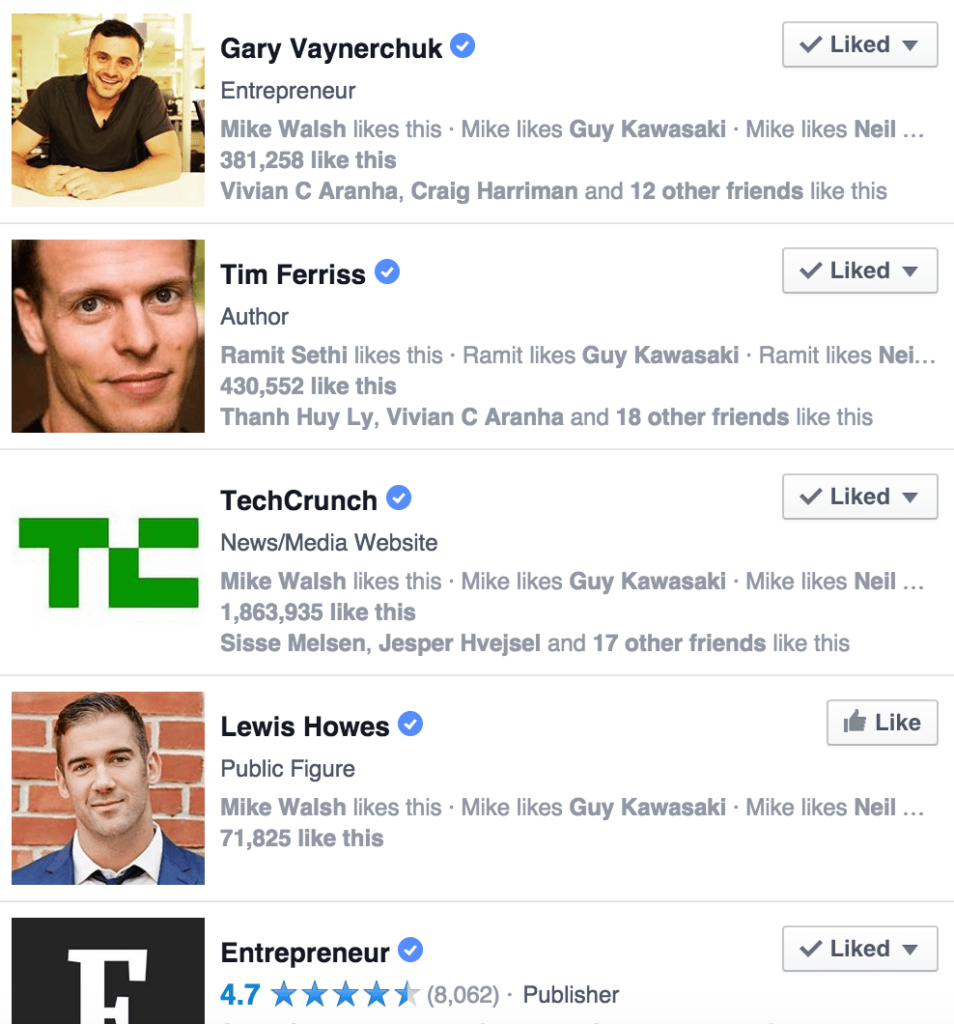
Then go back to your ad setup and choose the most niche-based pages within your field.
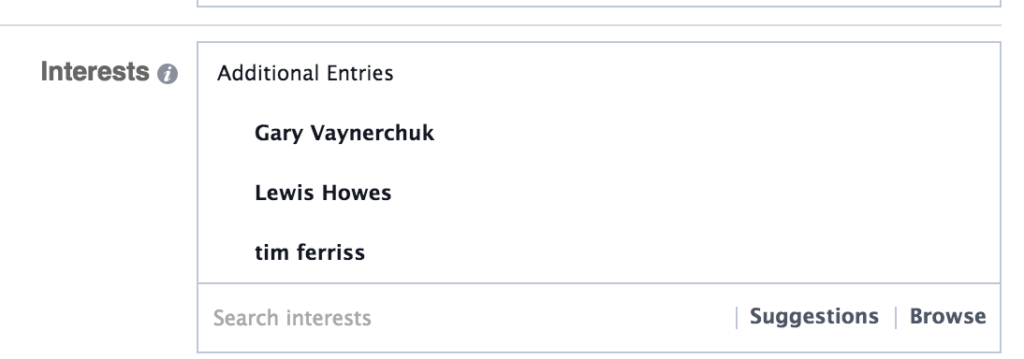
Personally, I find that the interest method has become too broad. It doesn’t work as well for me as the other target groups. If you have any good tips for this, I’d love to hear from you in the comments below.
Placements on Meta
When we work with audiences, we also need to work with placements; namely, where you want your ads to be shown. Once again, a significant factor that can quickly cost you a lot of money if you don’t manage it properly
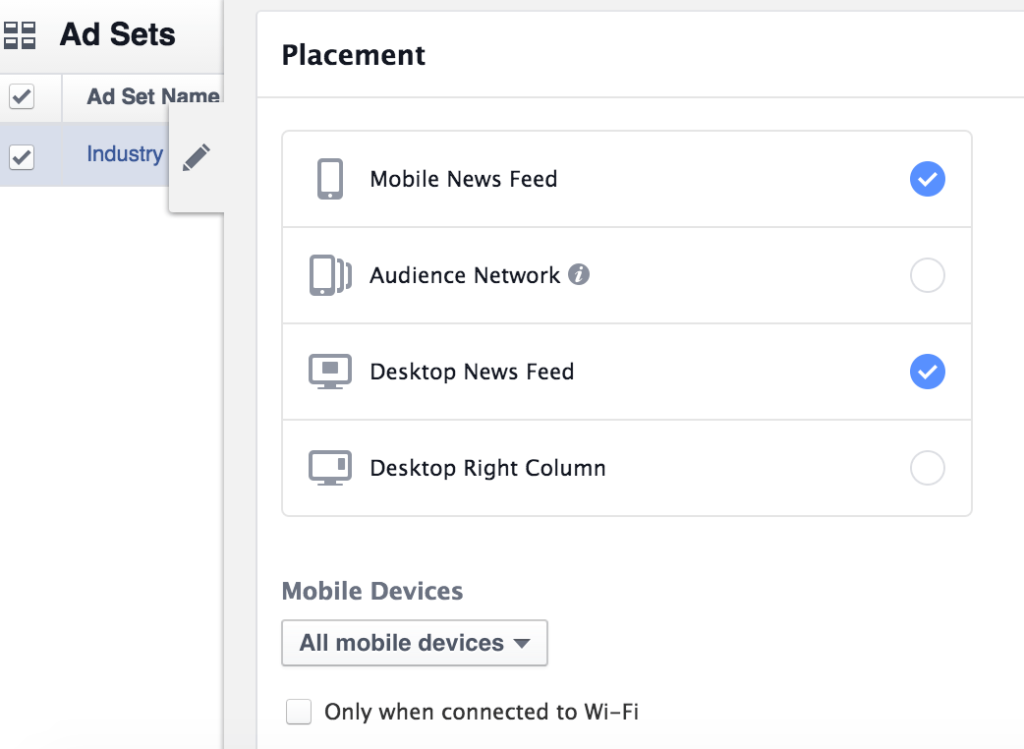
As seen above, you can choose different placements. Most placements are self-explanatory. The only one you might question is the audience network. This is essentially Facebook’s attempt to optimize their revenue by expanding their ad platform beyond Facebook.
This means that you advertise through your audiences on Facebook, but on Facebook’s partner networks. (In the future, we will probably see Instagram included here and Snapchat if Facebook manages to buy them)
So, when should you use the different placements?
In theory, you can select all placements. Facebook optimizes on its own, so your ads are shown where they perform best. However, Facebook cannot see how visitors experience your site.
If you’ve chosen to optimize for mobile, but your mobile site isn’t particularly mobile-friendly – then it’s not a good idea to target people on mobile!
When I then target the same visitors (via custom audiences as mentioned before) with product sales related to the content they have read, but on desktop = that’s where the magic happens!
3. Design of Facebook ads
Ad design is a topic in itself, and in my opinion, here’s no one-size-fits-all approach. It very much depends on your industry, target audiences, and what resonates with your audience, as well as what you want to achieve.
However, one thing always applies – THE HEADLINE!
One of the world’s largest news sites, Upworthy, gets an insane amount of traffic through their headlines. In fact, their headline strategy was one of the reasons they suddenly helped their content go viral.
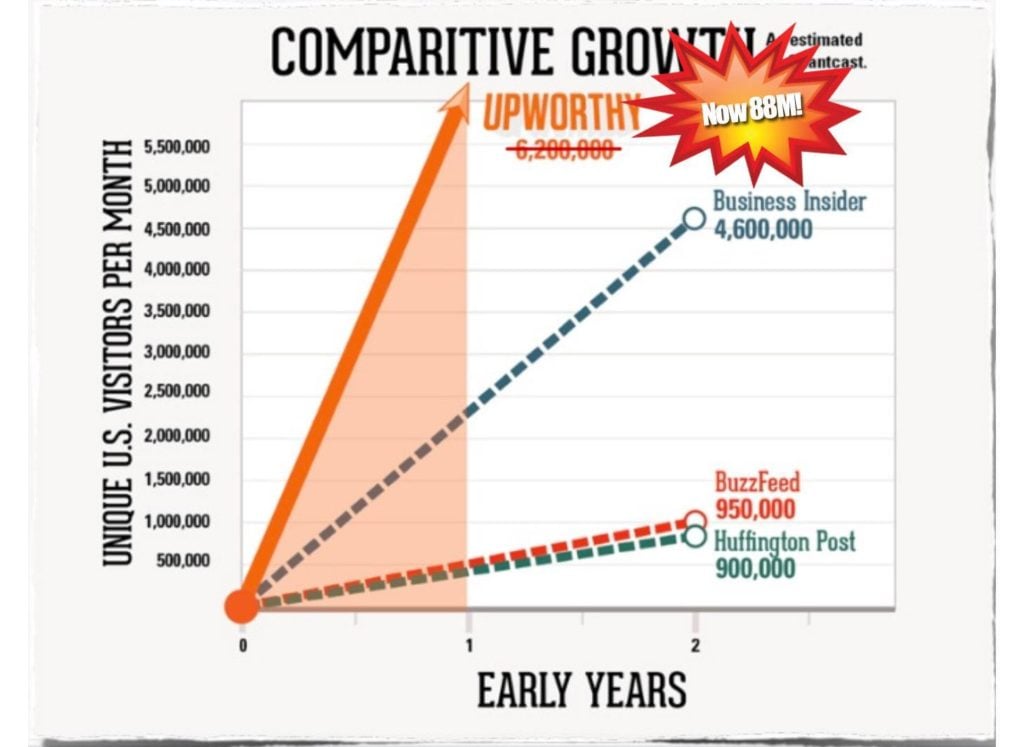
As mentioned in my previous post on content marketing, you should of course consider how ethical your headline is, but if you want traffic via Facebook, your headlines need to stand out, otherwise they’ll get lost among all the other ads – because as mentioned earlier, the competition is getting tighter and tighter on Facebook.
Example of an ad:

I could make my headlines much more aggressive, but here I try to target those who want to get started with Instagram marketing, and I’m not interested in getting a bunch of cheap clicks.
On the contrary, I want more quality visitors. So remember, the headline should not mislead the user, but rather give an expectation of what they can expect after clicking so that the user doesn’t leave disappointed and waste your (sometimes expensive) ad dollars.
4. The value of Facebook marketing
What is the value? Another question I often hear about social media. There’s no simple answer to what the true value is – whether it’s because it’s hard to track, or because people don’t know what KPIs to set – I’m not sure. But what I do know is that it’s possible to get a lot out of Facebook.
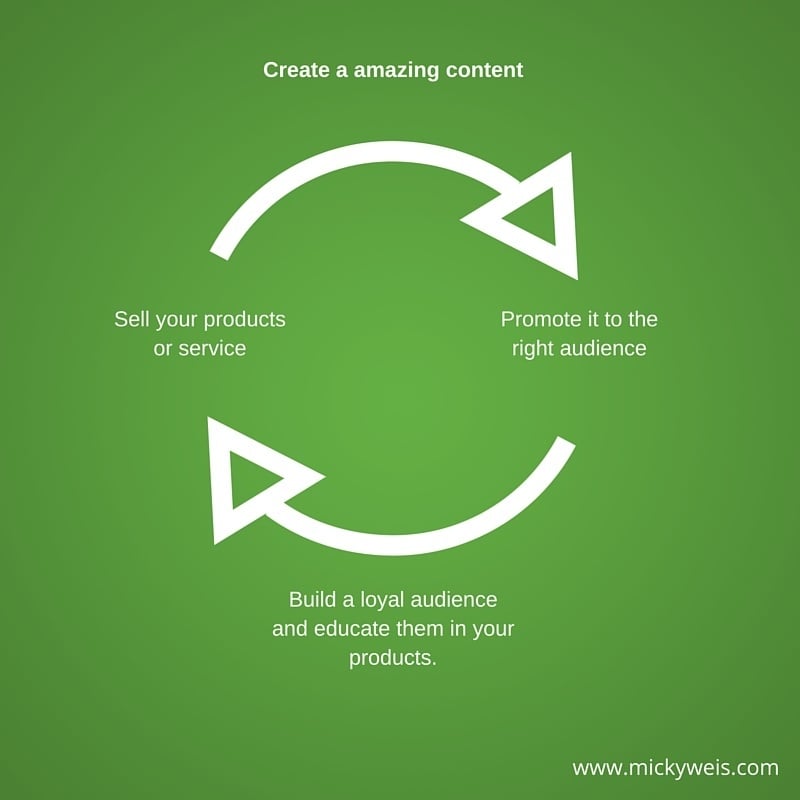
I think the model above explains it well. It’s not about pushing products out, but about educating your customers and potential customers about your products. Value, in other words, can be many things – what kind of value are you creating?
Email sign-ups
There are many good ways to increase your e-mail list. Growing your email list can create great value for your business, as e-mail marketing is still the best sales channel. There are plenty of tools you can use.
You can, for example, sign up for Mailchimp and set up a campaign for free. If you’re running a serious business or website, you should start with email marketing as your first priority – even before Facebook advertising.
Good tips for encouraging users to sign up for your newsletter:
- Checklists & templates
- Free tools
- Video training
- E-books
- Whitepapers
For Slikhaar, it’s videos
Slikhaar – one of Europe’s largest YouTube channels within hairstyling – gets a lot out of their content. Therefore, it also makes sense for them to use their budget on Facebook to increase views, likes, and shares on their videos.
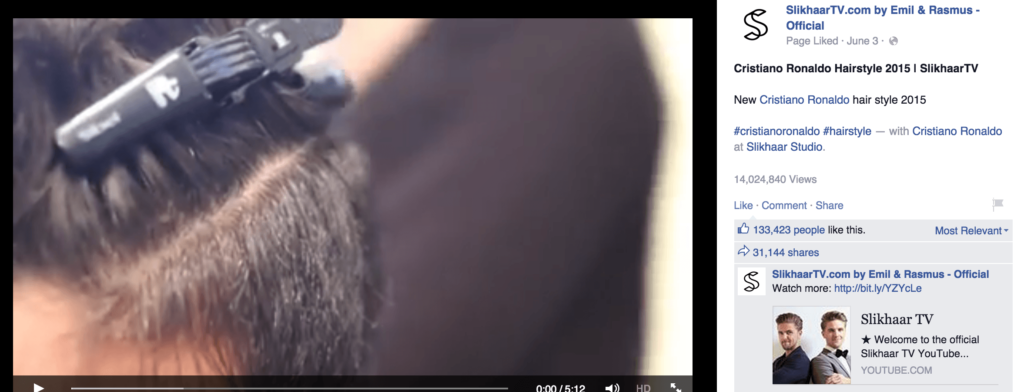
Check out these stats!
- 14,000,000 views
- 133,000 likes
- 31,144 shares
And what did we spend on the campaign? Approximately 30,000 Danish kroner. In return, we received 14,000,000 views, which is extremely strong, while in the same period, we gained over 100,000 new Facebook likes and 30,000 YouTube subscribers – plus, sales continue to grow as the brand’s value grows.
Once again: It’s not necessarily sales ads that always work on social media. Often, people are more likely to click on good content, which opens up new avenues through which you can sell your products.
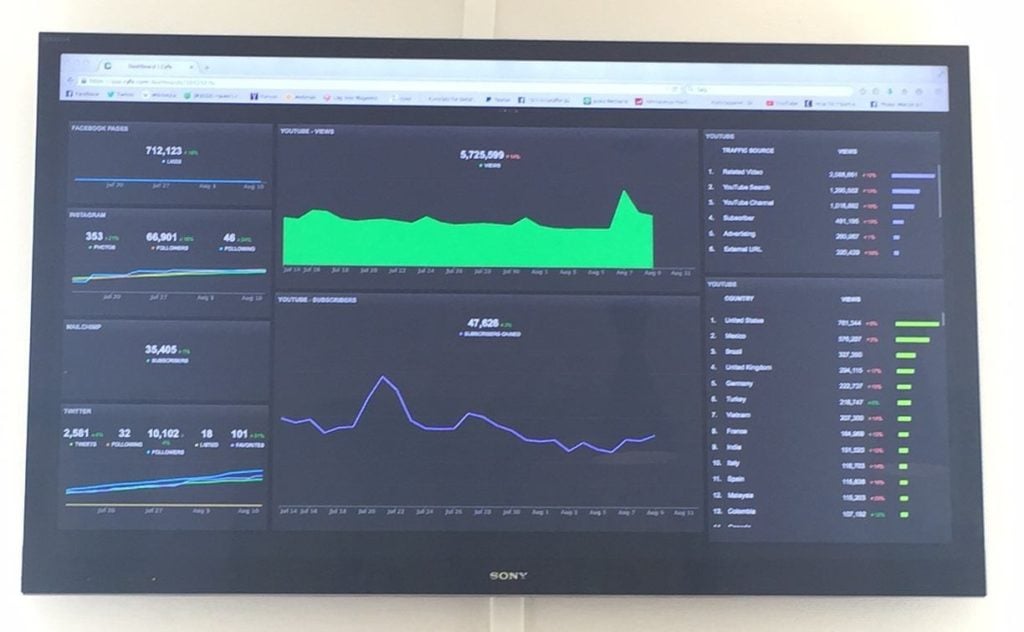
KPI board at SlikhaarTV
We always know what we’re tracking and how we’re doing it
5. Tracking & reporting on Facebook
When when working with Facebook ads, there are many ways to track your sales. I still use the ‘old-fashioned way’, so I use URL tagging. This means I add an extra tracking code to my URLs, so I can see how the data appears in Google Analytics afterward.
If we’re not talking about sales, you can also use Facebook’s reporting module. This can be a good indicator of how your ads and audiences are performing on all other parameters such as placement, age, gender, etc.
URL tracking setup
Basically, I just tag my URLs through Google’s URL builder. This way, I can set up some tags that can be seen in Analytics, as mentioned before. Let me give an example.
Start by opening Google URL builder – then set up your data
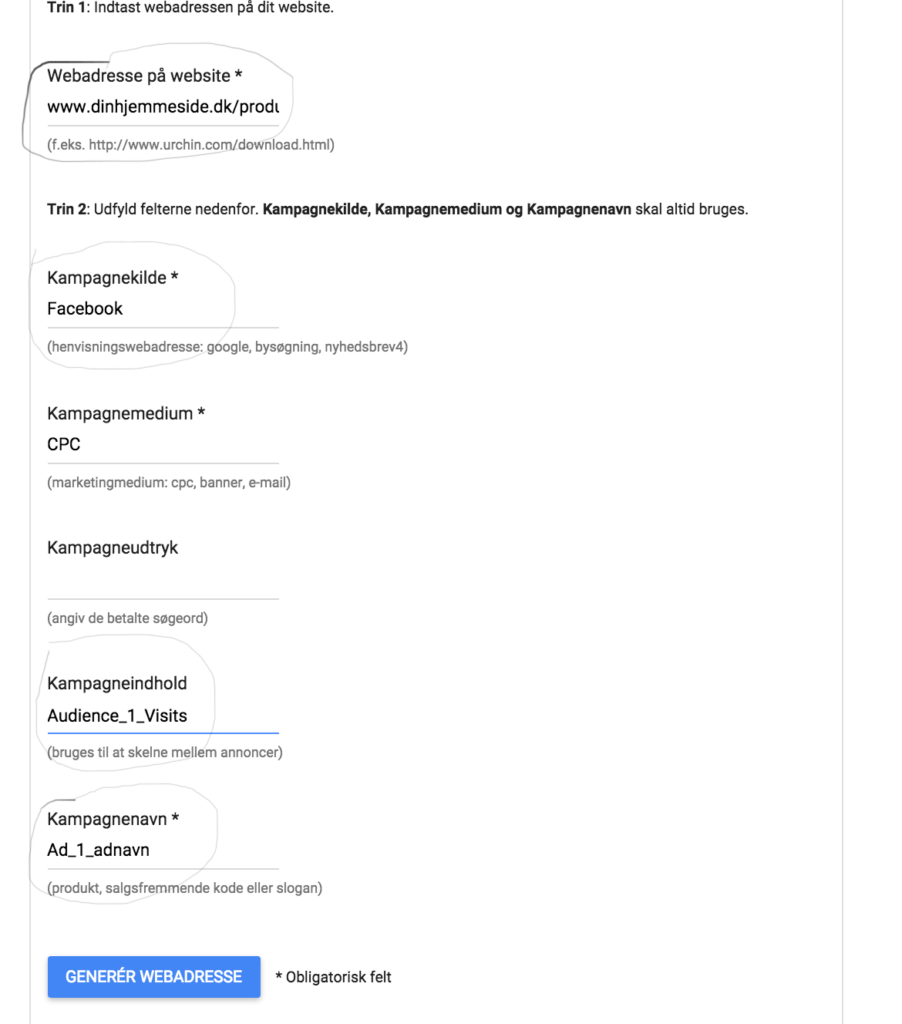
As you can see above, I have set up various tags. Instead of a URL address that looks like this:
www.hjemmeside.dk/produktnavn
It looks like this:
This code allows me to see the following in Analytics:
You’ll see it labeled as ‘Facebook / CPC’ in Analytics
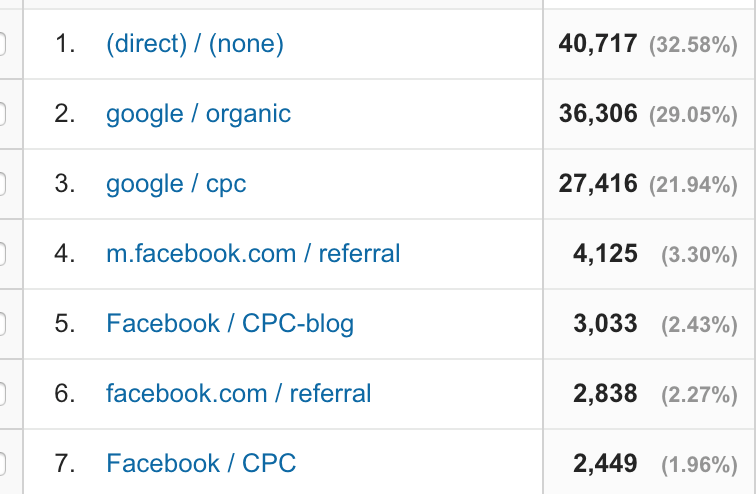
Furthermore, I will be able to see exactly how much that source has generated in revenue.

This is a really handy tool when working with optimizing sales channels. What I often do is create an Excel document where I compare ad spend for the respective month for the target groups and compare it to revenue. I believe this gives me the best possible ROI (Return on Investment) calculation.
6. Reporting
The last part we need to look at is Facebook’s reporting system – a very useful tool that can be used to test a wide range of elements. You can particularly benefit from it when running engagement or like campaigns, video views, or page engagement.
You can, for example, test these metrics, as you see in the dropdown below
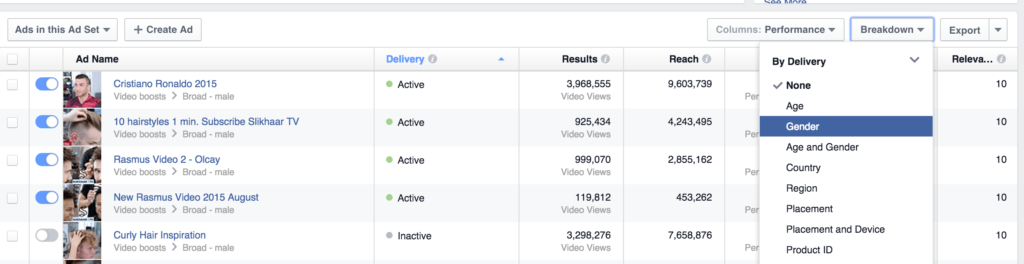
It can be quite interesting to know, for example, if your video views are cheaper on mobile and to know which countries give the most return, as well as which age group is the most active, etc.
It’s again about knowing which metrics you want to test. If you make small adjustments daily or weekly, depending on your time, you’ll quickly see that you get more out of your ad dollars.
You can also choose – depending on which campaign you’re running – predefined performance results. You can see an example below:
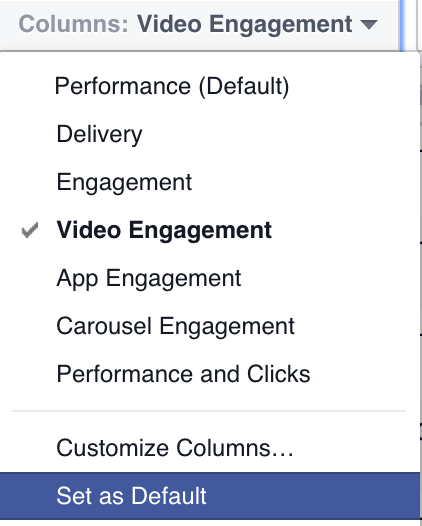
A very useful tool that, for each campaign objective, can help you see how your ads are performing. The reporting system can do a lot, so I recommend that you check it out and spend a few hours with it.
If you do, you’ll quickly get a good feeling of which things you want to test again – it depends a lot on your goals with Facebook and your industry.
That’s all for this time!
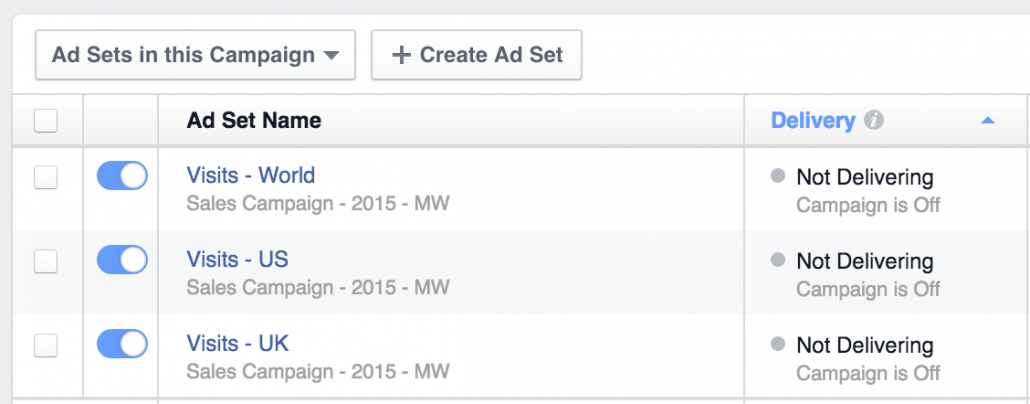
I just set up a sales campaign for Sorry Mom with their new tattoo lotion, which we plan to launch next week.
We will primarily run some re-marketing campaigns targeting those who have added something to the cart before but haven’t completed their order. I promise to provide an update on this campaign!
7. New updates from Facebook
Facebook continuously adds new features to their already advanced ad platform.
Today, I’ll give you 5 of the latest features – I’ve personally tested these quite a bit recently.
Maybe you already know them, or maybe there’s new knowledge to gain?
Let’s take a closer look!
Utilize people’s behavior on your website
One of the best ways to target a very segmented audience is to use the traffic you have on your website.
Audiences
Once you’ve done this, Facebook matches your users on Facebook.
You can then choose this as an audience in your ad planning.
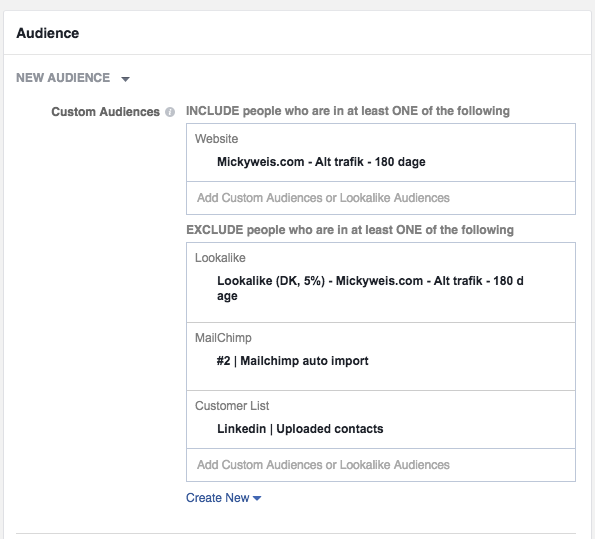
As you can see, I’ve selected “Mickyweis.com – All Traffic – 180 days”
This means that those who have visited my website in the last 180 days will see these ads
Also, remember to exclude your other audiences so that the data is not distorted.
People who have taken a specific action
You can also take it a step further!
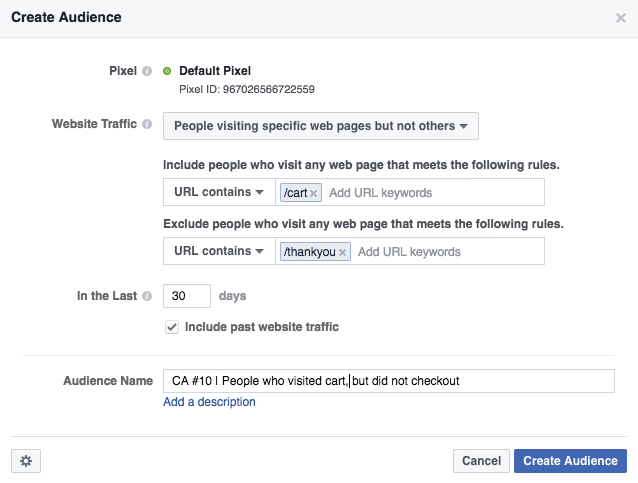
Let’s assume you have a webshop – you can also target your ads to people who have visited your “shopping cart” and haven’t completed their purchase.
As you can see below, I’ve included those who have visited /cart and not /thankyou page
This means that those who have visited the shopping cart but haven’t reached the “thank you for your purchase” page will see these ads
Examples of good audiences
- People who have visited a website in the last 30 days and haven’t bought anything
- People who have visited a blog post – advertise a product that fits with it
- People who haven’t visited your website in a long time – win them back
- People who have visited in the last 24 hours (target them for awareness)
Create ads
The last step is, of course, to create the ads.
Here, you can play with different emotional call-to-actions.
Examples of good text ads
- Did you forget to complete your purchase?
- We miss you! Here’s 20% off in our webshop
- You previously bought magnesium, but did you know this? (new post)
8. Ads in messenger
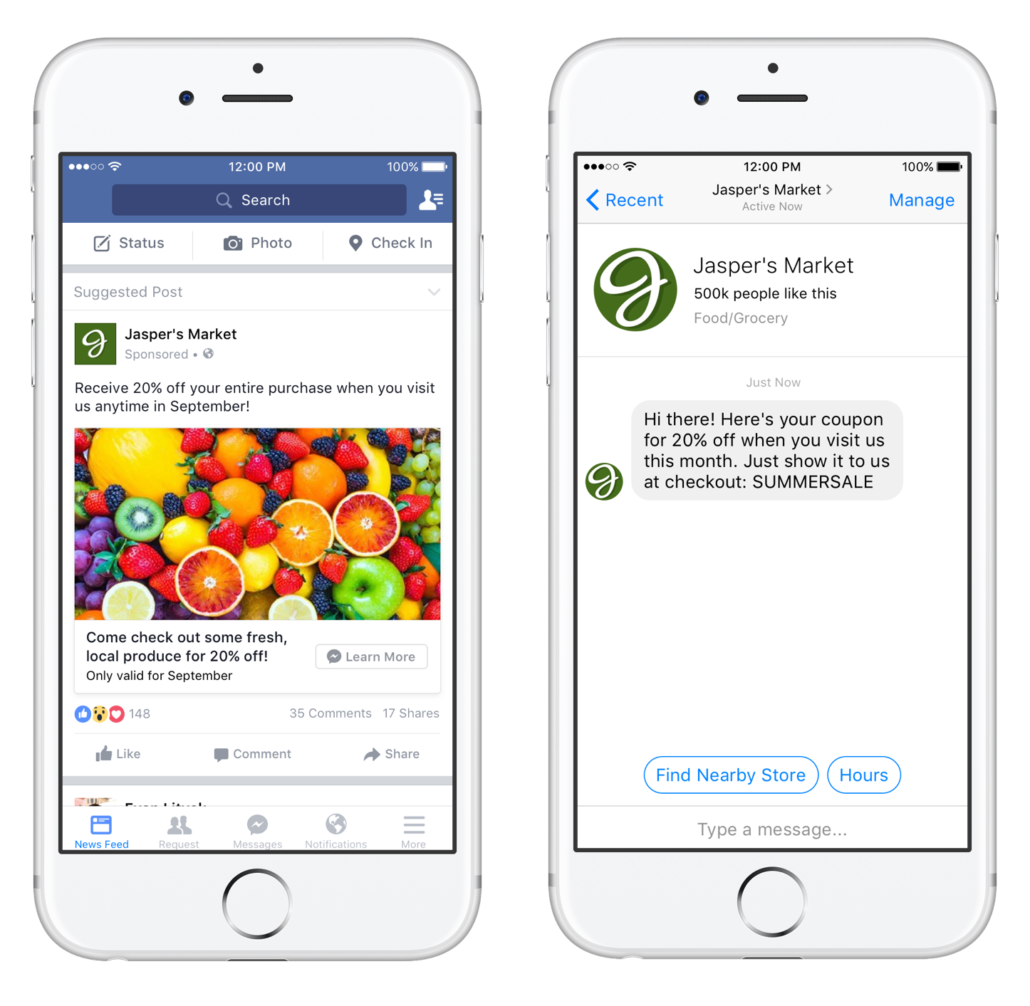
A new feature on Facebook is that you can now get people into the Messenger app when they click on an ad.
Why do that?
Imagine you want to start a conversation with the customer – it’s actually a bit like a modern version of personal advice or guidance.
Several statistics also show that many people are more comfortable writing in a chat or via email than talking on the phone.
I imagine that many real estate agents, banks, insurance companies, etc., can get a lot out of this.
We will be testing it on Peter Bendtsen in relation to personal training in January.
It will be something like “Do you want to get started with training? Write to me about your dreams, and let’s make them a reality together” – then we already have a dialogue with the customer from the start.
This is what it looks like from Jasper’s Market
9. Tag products
Facebook is doing a lot to surpass Google in product sales. We have to admit that most of us still spend time on Facebook to chat with our friends and to get inspiration from various people and pages we follow – not to buy products.
That’s why Facebook has just launched a tool that makes it easier to buy the products we see – and easier for businesses to make us aware of their products.
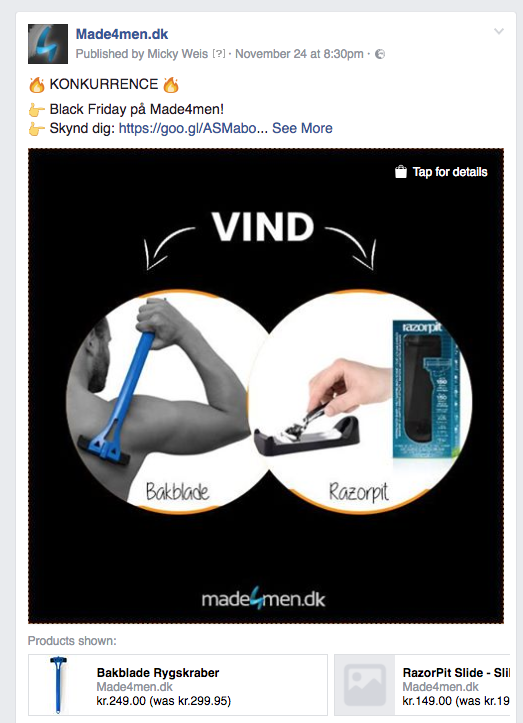
Example from Made4men
We have just tested this on Made4men, and it looks like this
How it works
You need to connect your product catalog via your webshop (Shopify, Magento, or WooCommerce have relatively simple integrations).
This essentially means that Facebook pulls products from a product feed, similar to platforms like Pricerunner and Partner-ads.
When it works, you can tag products in posts.
Example 1 – tag products in posts
As seen below, I get a feature called tag a product
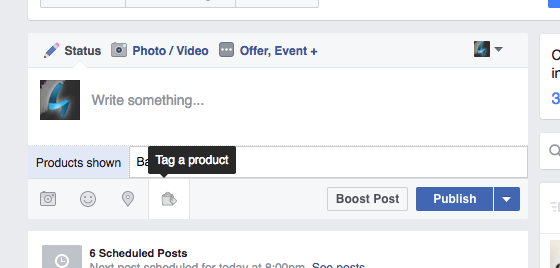
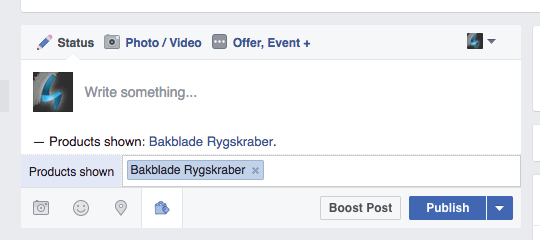
In “products shown,” you can start typing a product name, and Facebook will then find it in your feed
Example 2 – tag products in images
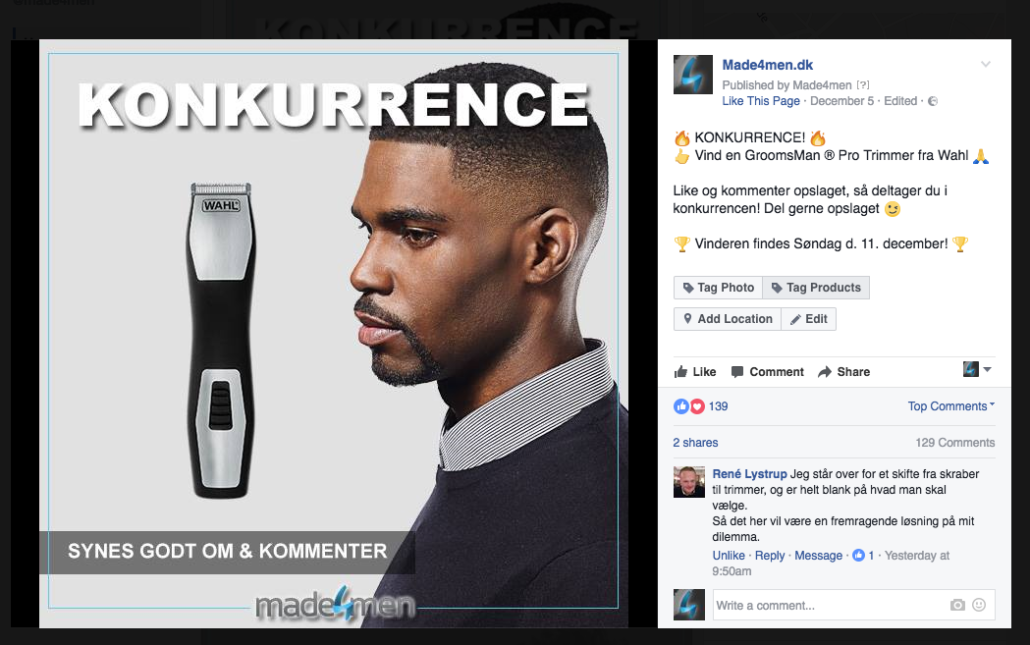
Do you have a very visual brand, like jewelry? It works the same way.
As you can see, it says “tag products” on the left and right side – you then get the option to tag products in the image.
Links
Gamechanger for Instagram
Instagram has just launched (they’re smartly owned by Facebook, which will probably roll the feature out further) that they will also do something similar to tag products, which can lead directly to the webshop selling the particular product.
A feature I believe in a lot – especially if it eventually doesn’t require a product catalog. This will make it possible for bloggers, larger Instagram accounts, etc., to create affiliate businesses on a whole new level.
Additionally, it will benefit companies that actively use bloggers, as they can get even more out of their collaborations.
10. Engagement-based audiences
A newer feature that Facebook has just launched is that you can target your ads to people who have engaged with posts or ads from your Facebook page.
What opportunities does this open up?
Let’s assume you run a very active Facebook page where you hold contests and create viral posts.
Then you have a strong chance of getting them to like your page.
It could also be that you’ve written a blog post that gets a lot of likes – why not advertise a product similar to the post to this audience?
Most people who participate aren’t actually fans of your page, especially not if it goes viral.
And that’s a missed opportunity!
11. Upload the email list
Something I’ve found extremely valuable is to use your newsletter subscribers as an audience.
You can do this through Custom Audiences.
For example, if you have a large customer database or many newsletter subscribers – it could be via your blog – then you have the opportunity to target them with Facebook ads.
Best practices
- Segment your email list with your best customers. Export all those who have spent over 100 dollars, for example.
- You don’t need to sort by gender, age, and location before uploading the email list to Facebook. You can do that through Facebook’s ad system once you’ve uploaded the list.
12. Use the same audiences on Instagram
You may have already experimented with Instagram advertising.
The great thing is that many of these new features also work for Instagram.
You can also use these audiences on Instagram.
In the ad set, you can easily choose the placements you want
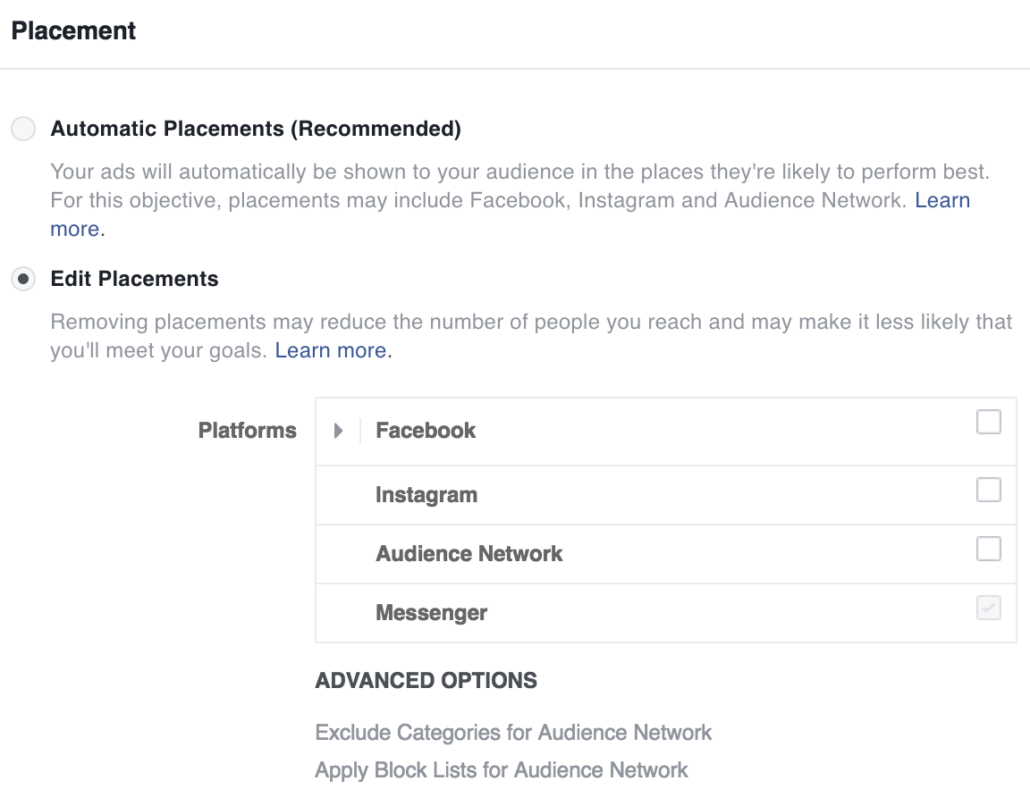
The problem with running both platforms in the same audience is that Facebook will just show your ads where it makes sense for their algorithm.
Additionally, it requires a bit more experience in reporting to see which platforms and ads are costing the most. Want to take your advertising further?
19 extra tips for your Facebook advertising
I often get asked: Micky, do you only work strategically with the companies you work with?
Actually, the answer is no, but with some modifications. Over the last 10 years, I’ve been extremely privileged to work across brands, companies, large budgets, and tools.
I’m directly involved in making sure everything from audiences to the ads you, as a consumer, see on the platform performs as expected
Where I think I’ve become more strategic over the years is by not being the person who says you should only use one specific strategy and run Facebook advertising.
It’s not certain that your particular company will benefit from Facebook advertising; perhaps TikTok, Pinterest, Twitter, or something else might work better?
Furthermore, One of the advantages I have when developing ads is that I deeply understand the company. This gives me a much better understanding of what the consumer wants from the company and what the company wants to communicate.
Over the past five years, I’ve focused more on strategy.
Instead of convincing a customer that they should use advertising or, for example, search engine optimization, I often rethink the business model.
I look at the resources the company has available, their ability to execute my initiatives (there’s no point in starting a bunch of things if the company doesn’t have the resources to implement them), what budgets we are working with, what the competitors are doing, which media are relevant – and then we dive into the individual channels.
One of the channels I work a lot with is Facebook and Instagram advertising, but maybe TikTok, LinkedIn, and Pinterest will take a bigger slice of the pie in the future, but more on that later.
When you use the budgets I do across so many cases, you learn constantly.
I have the opportunity to implement and pass on that learning across all the cases I work with, through the workshops I hold – which ultimately should help distribute the budgets in the best possible way.
Since I wrote the ultimate guide to Facebook advertising, much has changed – Facebook is constantly evolving, and more and more opportunities are arising.
Therefore, in this post, I will cover some of the functions, tips, tricks, mistakes, and generally what I think works really well at the moment.
This post is for those of you who have previously become acquainted with Facebook advertising – otherwise, some of the terms may be new, but I hope it can provide inspiration for your business.
Mindset for Facebook advertising
There are a wealth of studies analyzing how much social media influences our behavior in terms of the purchases and actions we make.
However, I still often encounter confusion when it comes to Facebook advertising and social media advertising in general, unfortunately, but that’s where my job is to create transparency.
You can’t compare Facebook and Google as channels that drive traffic.
That’s the case with many different channels. There’s room for all of them, but there are differences in when they come into play.
Instead of writing a lengthy blog post, I’ve tried to create a funnel visualization that might support my point.
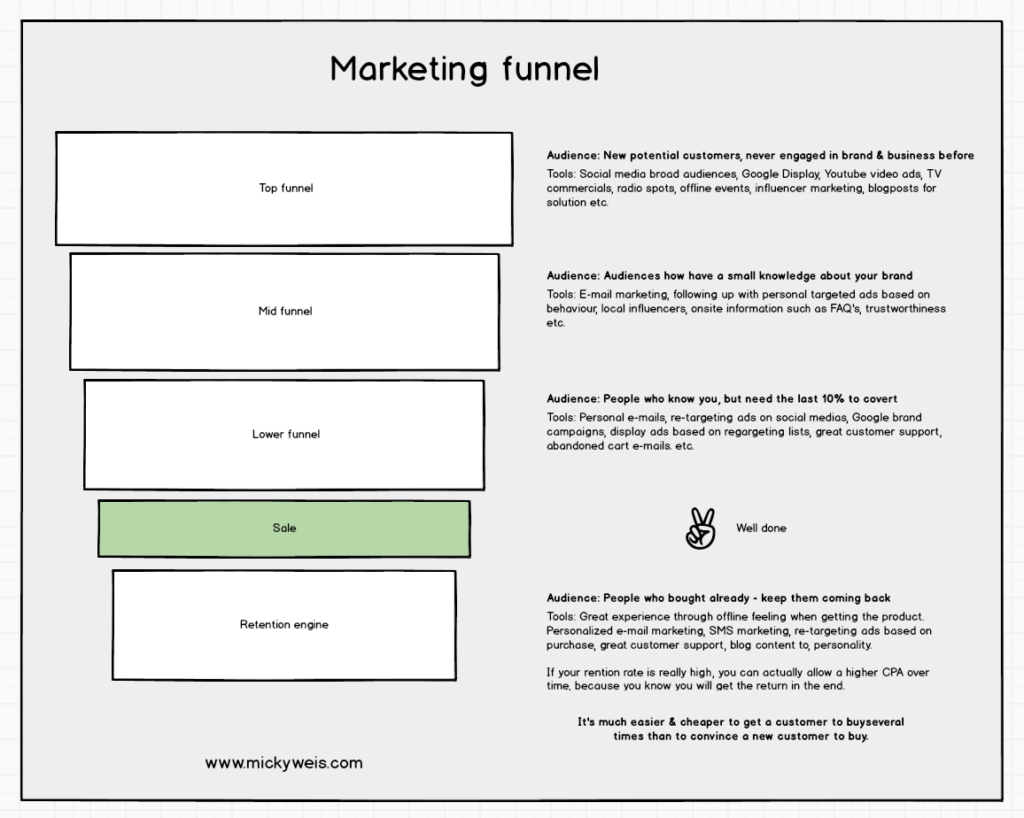
As I often say when it comes to advertising and online marketing as a whole, it’s really about focusing on the psychology and behavior you want a given user to take.
Facebook attribution
The customer journey is becoming increasingly complex across digital channels, and the same is true for Facebook & Instagram.
You often see success stories shared exclusively based on ROAS – that is, how much was spent and how much was generated.
This is not an accurate picture – unless you consider attribution models in your considerations.
Simply explained:
All the tools we use have their own way of “attributing” value for a given action.
Facebook has the standard attribution that anyone who has clicked on an ad in the last 28 days or viewed an ad in the last 24 hours and placed an order, Facebook gets credit for the sale – but should they? It’s very difficult to answer, and it’s highly individual from industry to industry.
There is also a difference in how expensive the products you sell are and how long your customer journey is.
For example, if we look at a webshop, their ROAS will often look completely crazy compared to Facebook’s data.
Because people buy often, and there are many touchpoints where they are influenced – this creates the great possibility that they may well buy from channels other than Facebook & Instagram. But if you use Facebook’s standard attribution, Facebook will still take credit for the sale.
Below you can see spending on Facebook advertising and revenue

The above image is from one of the accounts I manage on Facebook – it’s almost too good to be true, right?
It is, because in this case, we’re running with the standard attribution window, meaning that as pointed out earlier, anyone who has seen an ad in the last 24 hours or clicked in the last 28 days is still attributed to Facebook. In this case, we’re dealing with a webshop with a high repurchase rate, many different channels, newsletters, SMSs, and much more.
Here we often go in and compare the different attribution windows with each other.
So even though Facebook clearly plays a role, be careful not to look too rigidly at the numbers.
Facebook’s own attribution tool provides the opportunity to see how the different channels influence each other.
You also get the opportunity to compare the different attribution models.
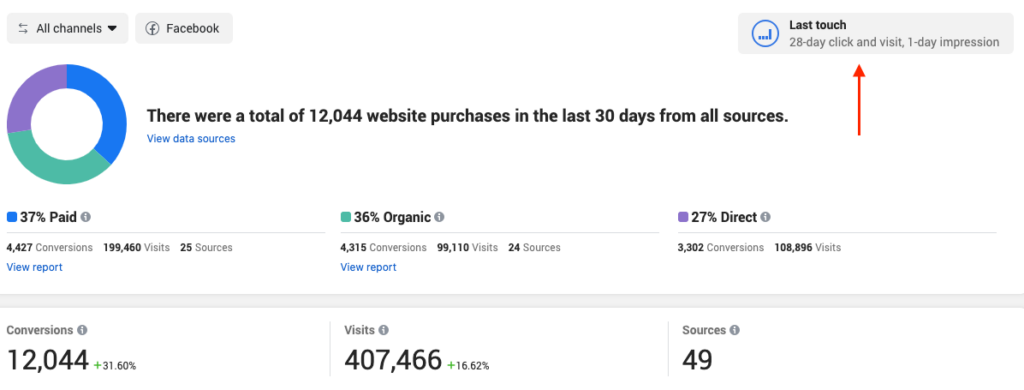
Another important factor in this journey is our “touchpoints”.
Previously, we had very few channels influencing us; that’s no longer the case.
To this end, Facebook has created a function in their attribution tool that can explain to us how mobile and desktop (laptop) influence each other.
It’s a super interesting analysis that still shows that follow-up advertising on desktop is important.
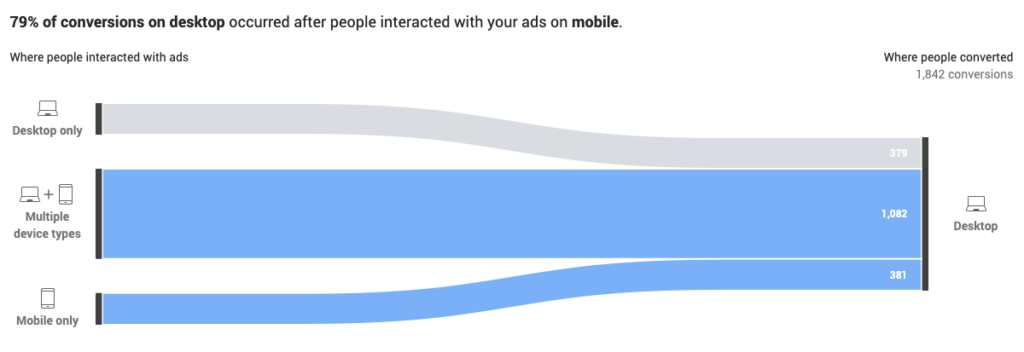
Use unique discount codes
Facebook has a feature that allows you to create an offer as an ad, and thus have a discount code that is only available on Facebook.
This makes it easier to see how Facebook actually influences sales because if people use the discount code, it means they saw the ad, as the discount code couldn’t be obtained from anywhere else.
We recently tested this on Molly & My.
Below is the ad as a user would see it.
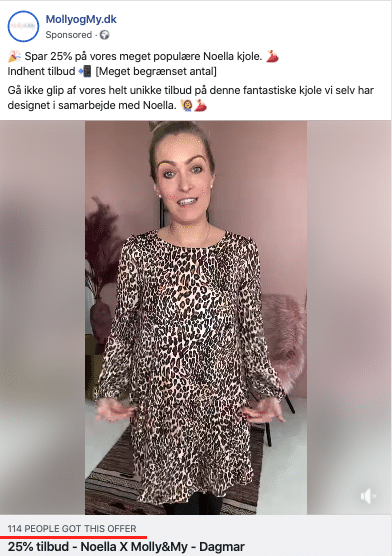
The result ended up being okay, but not as good as the screenshot I showed earlier, i.e., the ROAS part wasn’t as good because suddenly we could track the sales that came exclusively via the use of the discount code.
Because we’re giving a discount on the item, offering the possibility of returns, and spending money on advertising, it can definitely result in a loss. It wasn’t the case here, but it’s worth testing!
Objectives and tracking
The first thing I believe you should always start with is having your objectives for Facebook advertising in mind – and this actually applies to all strategies you launch digitally.
How else can you measure success or the opposite?
What are you trying to achieve with your advertising? This makes it much easier to think about the right strategy from the start.
This again brings me back to saying: It varies greatly from industry to industry, what the purpose of the advertising is.
Examples of diversity among industries:
A car purchase is a considered purchase, and there are many interactions before we make the final decision to buy a car. Therefore, it also requires a different effort than, for example, running a webshop. A car dealership, for example, will track elements such as: Number of inquiries, booking of test drives, phone calls, etc.
Additionally, you want to maintain a strong brand awareness, which ensures you are always top of mind, which is often the solution when we talk about considered purchases.
As seen below, an ad with app installs will look a little different than, for example, an ad for a webshop.
It also means that your objective is different and therefore also the analysis you perform afterward.
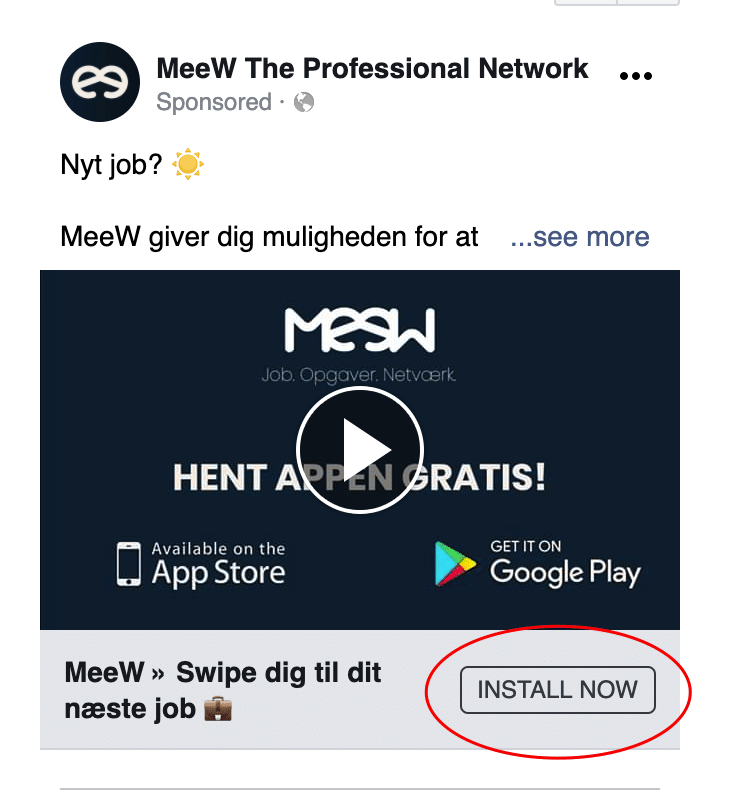
It also means that the focus should be on what the objective of the business is: App installs.
And as the results show below, that’s what we’re aiming for.

Brand searches
I still believe that too many people forget to think about how Facebook and Instagram – as well as all other social media, have a huge synergy effect that supports your brand. For example, if you look at channels like Facebook, but also like YouTube, it’s rare that we can push people to buy now and here.
The challenge is that we often forget that all marketing is about psychology. So even if you can’t get a sale from a given customer who sees you on Facebook, your brand may still have stuck in the user’s mind, depending on your creativity. Therefore, it’s important to keep an eye on your brand searches.
Campaign budget versus ad set budget
For those of you who have used Facebook’s Ads Manager, formerly known as Power Editor, you will have noticed that Facebook has changed the way you manage your budgets on the platform. Previously, we were used to managing our budgets at the ad set level.
That has changed – and in a few months, it will become permanent that everyone must use campaign budget optimization.
This means that once you’ve created a campaign and set a given budget for that campaign, and under that have some audiences, Facebook will automatically distribute the budget from the campaign level down to your audiences. It also means you need to ensure that the audiences under a given campaign make sense that they are in the same pool and therefore in competition with each other.
So make sure you have control over the structure after this change has been made.
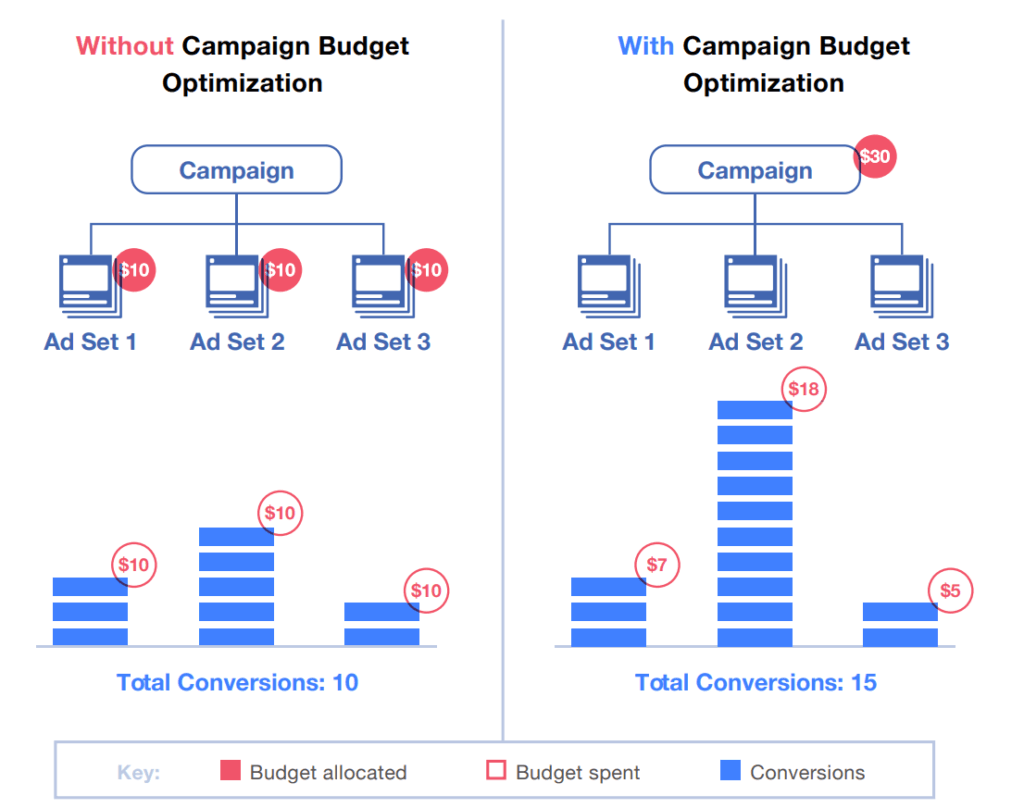
Source: https://newsfeed.org/
Audiences and segmentation
Once you’ve nailed down what your objective with your advertising is, then you get to the fun part.
And a lot is happening in this area at the moment, which also means that the possibilities are increasing, and you can test new things.
You can, of course, go “all broad” and just target everyone in Denmark and then wait for the algorithm to crawl through the audience and find those who are most likely to buy or perform the action you’ve set as the goal of the campaign.
However, I still advocate testing more specific audiences, especially those called “lookalikes” that are based on existing data from your webshop or your CRM system.
Purchase behavior from Facebook analytics
Facebook’s analytics, which are constantly expanding, have a few fun things you can use in your advertising.
I know that Facebook analytics can seem very complex, but try to follow along here.
They have a tab called “percentiles”.
If you select it, you can see how the different % of your customers perform.
For example, I have a webshop where the top 5% of my customers have purchased 4 times or more in the last 90 days.
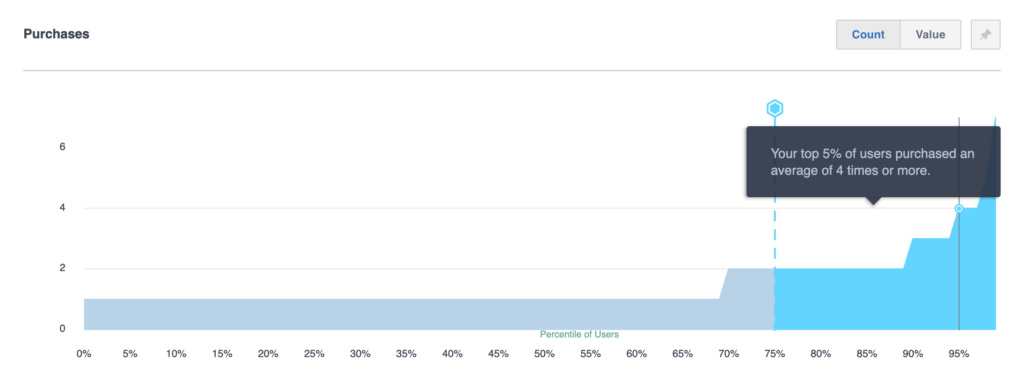
Then I go into my audiences and use this knowledge.

Now I know that I have my best users in an audience.
Hold onto it, we’ll use it again later.
It’s only your imagination that sets the limits with the knowledge you get from Facebook Analytics.
It again depends on which industry you are in. This can be used in webshops that have many sales and therefore enough data.
If, for example, I were a car dealer, I would look at other elements such as:
- Time on site (top 5%of those who have spent the most time on the site)
- People who have inquired via contact form
- People who have inquired via phone calls
- People who have inquired via email
* Volume must be large enough.
Audience: Look-a-like – ideas and possibilities
Look-a-like audiences are audiences based on existing information/data.
It means asking Facebook’s algorithm to find a percentage in Denmark (or other countries) that most resembles a given data source.
You can provide Facebook with this data yourself.
Here are the data I often base my “look-a-like” on:
- Upload your email list (consider segmenting it into “inactive customers” “best customers”, etc.)
- Those who spend the most time on your website
- Those who have spent the most money on your website
- Those who have made purchases on your website
- Those who have added something to the cart in the last 30 days
In principle, it’s about how much data flows through your website.
If you have a website that isn’t very visited and doesn’t have enough data, it’s hard to get the most out of these audiences.
So, it may be about zooming out and going broader, but you can always use those who have visited your website in the last 30/90/180 days and then create a look-a-like audience based on these.
Then, you can try playing with the percentages. I usually use 3-5%, but if you have a product that appeals to a broad audience, it’s perfectly okay to test 10% – knowing that it may take longer for Facebook’s algorithm to narrow down those who actually intend to place an order.
Audience: Detailed interests
Facebook is also constantly ensuring that their algorithm gets more and more power – this also means that the opportunities we as advertisers on the platform have are increasing.
In the USA, for example, it’s possible to show your ads to audiences based on household income – this has not yet come to Denmark.
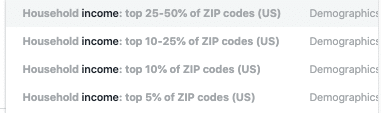
However, Facebook has created a segmentation option called “engaged shoppers” – translated as “engaged buyers”.
This segmentation means that you exclusively show your ads to users who have clicked on “shop now” / “buy now” in the last week.
This means active users who are very likely to shop often via Facebook advertising, making the audience very interesting for companies that want to sell online.
This is fun to play around with in different contexts, including a simple example below.
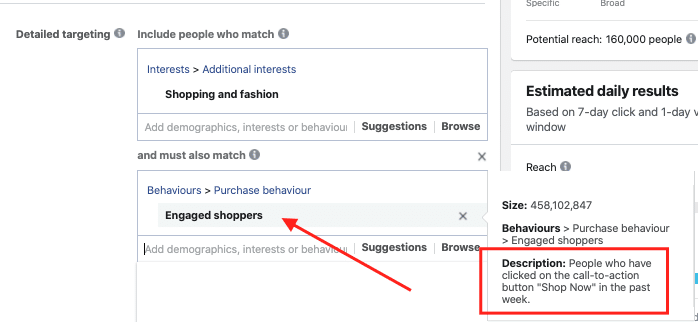
My experience is that these audiences can sometimes be quicker to find a reasonable CPA (cost per sale) than running ads across the entire country of Denmark.
As you might sense, it’s not all black and white, because it also involves the creative aspect – what the users see, which I’ll get into further down in the post.
Audience: Re-targeting funnel
Not everyone working with Facebook advertising agrees with this strategy, and that’s fine – we all have our own ways of doing things.
However, I like to incorporate psychology into my advertising, especially if it’s a considered purchase and you want to build a genuine relationship with your users.
To make it simple, I’ve created my own little re-targeting funnel below.
Clearly, the more traffic you have, the longer funnels you can build – and the shorter intervals you can allow.
If you have less traffic, you might want to extend these “funnel – audiences” so people don’t see the same thing repeatedly.
Here we go:
7 – 14 days – Here, we’ve excluded the first 7 days of traffic on the website and are targeting only the last 7 days. I’d show some social proof here, like a slideshow of customers who have purchased the products or similar content. It could also be customer testimonials if you have them.
14 – 30 days – We’ve excluded the first 14 days, as they’ve seen both of the above. Here, I would focus on showing some PR-related material if you have it.
30 – 45 days – We’re starting to drift away from the action – the visit to the website – so here, we want to get people back again. Consider showing a blog post, your values, core competencies, or company news.
The point of this flow is:
45 days later – if a user is asked about the company, they will certainly have an idea of who you are.
They may not know exactly where from, but they’ve caught your brand name and some of your core values.
Audience: Winback / retention
There are endless audiences that are fun to play with when it comes to Facebook advertising, so of course, I can’t mention all audiences in a blog post. There are many good guides online – and I think I’ve written a few here and there.
Another strategy could be a kind of “winback” strategy.
A strategy that often also applies to your email strategy.
- People who have visited your website in the last 180 days but haven’t bought anything in the last 150 days.
- People who have bought something but haven’t visited your website in the last 180 days.
- People who are on your email list but have never bought anything.
- People who follow you on Facebook but have never bought anything.
My point is again to emphasize: It’s only your imagination that sets the limits. Facebook’s algorithm will help you.
Make sure to incorporate the above into your strategy so that it fits your company and industry.
Advertising – Lead ads
Everyone wants sales, but what’s the next best thing if you don’t get a sale?
When we talk about Facebook advertising, the next best thing in my world is contact information for a person, especially if it’s someone who has shown interest in your product.
For this, Facebook has, for years, allowed us advertisers to use “Lead generation ads” – ads that solely aim to collect emails or phone numbers into a database of users.
When you create your campaigns, this is the one you should choose.
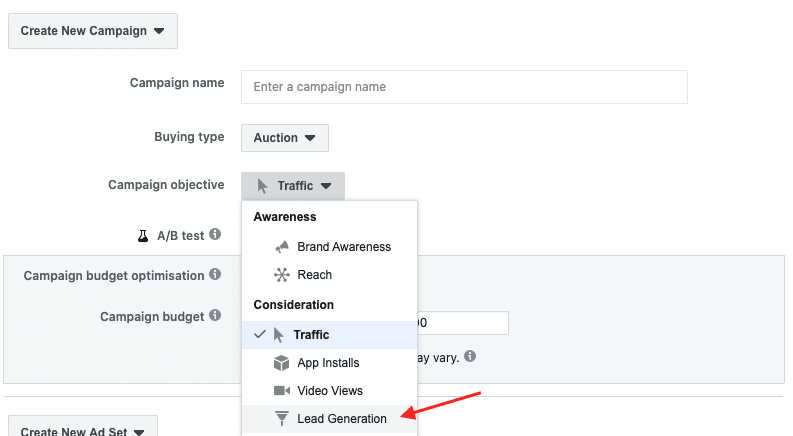
You can use some of the audiences I discussed in the section above.
Besides making sure your audience segmentation is on point, you also need to have an idea of how you’ll collect leads.
Here are a few examples of what might work:
- E-books – If you’re a personal trainer, B2B company, or marketing agency, it can be a good strategy to publish a free e-book in exchange for people signing up for your newsletter. This can be done very easily via Facebook lead generation ads.
- Contests – It’s still a good strategy, but make sure to keep the prize relevant to your company. Don’t offer an iPad because too many people will only participate to win an iPad and have no interest in your product.
- Access to pre-sale – If you’re a large fashion company like Stine Goya and people are eager to be first to sale launches and new collections, offer them the chance to join an exclusive list. This might make them a bit more expensive per lead, but on the other hand, they will also be of high value to your company.
It’s only your imagination that limits what you offer.
Here’s an example of what a
video ad in the lead format might look like:
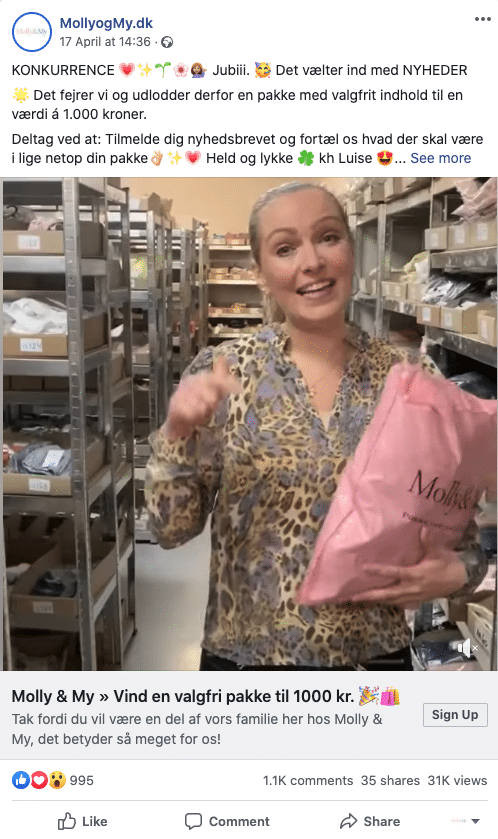
As you can see, the video clearly went viral for Molly & My, and we got 31,000 views on the video, and I can reveal that we got over 4,000 email sign-ups from this.
That’s not a bad investment on the email front, especially if these “leads” convert to sales in the future.
Use participant behavior as an audience in your advertising
When you’ve run a Facebook lead ad, you can afterward use people’s interaction with the lead ad in a new audience.
This means that everyone who, for example, opened this “form” – can receive an ad afterward.
This is what it looks like in “audiences”
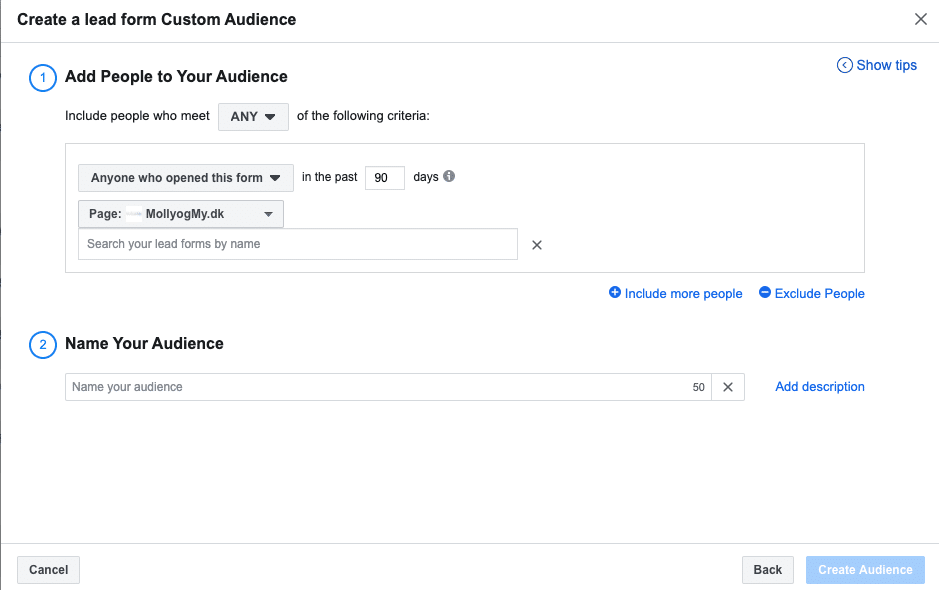
An example of this – if you ran a lead ad campaign on a new collection coming out, you can use this audience segmentation when the collection lands in stores.
This way, you ensure that those who signed up to receive the new collection by email also see it on Facebook & Instagram.
As you can hear, it’s only your imagination that limits the flows you build around your advertising.
And here we’ve only taken Facebook & Instagram into the loop, as I started by saying: Try to zoom out so you can see how all the different channels each have their own effect on the overall marketing picture.
Google ads & LinkedIn ads – lead generation ads
It’s not just Facebook that focuses on offering this form of advertising.
Google and LinkedIn also want to be part of the action.
That’s why it’s now also possible to use Google Lead ads directly in search results.
Currently, only open for beta, but it’s worth testing if you have the opportunity.
Watch the video below to see how it works.
As mentioned, the same goes for LinkedIn. They have created a similar tool called “Lead Gen Forms” – and it works in the same way as Facebook and Google.
Watch the video below to see how it works.
B2B sales – Lead generation – tip.Over the past few months, I’ve worked with several B2
B-related companies. This constantly generates good ideas – and one of them I want to share.
In these times, it’s hard to go out and sell, so we’ve come up with a little fun “trick”.
Set up lead ads (lead generation ads) through Facebook and LinkedIn. Connect it with Zapier, so you get leads into a system. You can choose what information you want. Like phone numbers, emails, the number of employees, etc.
Create a good ad where you offer your products, or a free review of your service. For example, via Zoom, but also that you send a free “package” of, for example, products to the company – it could be coffee (real case).
Be aware that the terms state that you may contact them for the purpose of showcasing products, etc.
I had a case with the following data:
- Number of leads: 754.
- Price per lead: 2.45 DKK per lead.
- Number of closed deals: 20 so far, worth 10,000 DKK per year.
As long as you stay product-specific and don’t come across too salesy, this has worked really well. I’ve had cases with office supplies, coffee, IT equipment, snacks, furnishings, and printer paper.
Advertising – The creative angle
The creative part is also becoming a bigger and bigger part of online advertising.
Previously, it was the technical part that took up a lot of our time as advertisers because it required a lot of technical knowledge to set up the right structure.
That’s no longer the case. Facebook, Instagram, yes, all digital platforms have become better and better at giving us technical tools that support our work.
Instead, our focus has shifted to creating content that’s actually interesting and engaging for users to follow.
This includes everything from videos to blog posts to personality – again: It’s about finding an edge for the individual company that others can’t beat.
We’ve all seen the classic ads where we forgot to buy the shoes we looked at, we want something more, we want depth.
Instead of explaining what I mean, I’d rather highlight a few cases.
I spend a lot of time researching and finding other cases that, in their own way, have an edge, do something different, and therefore have caught my attention.
Cases I think do well on the digital front
- Shaping new tomorrow – Perhaps one of the companies in Denmark that does this best. Their video content is unrivaled, they work with so many different messages, audiences, and are generally just very, very far ahead in my opinion. I never feel like I get tired of the content that Shaping New Tomorrow presents to me. It makes me always feel entertained. Something that must require many hours in terms of their content production.
- Molly & My – A case I’m personally involved in, but what I love about Molly & My is their personality. When they launch roller skates in their range, Luise (one of the owners) takes a spin on the roller skates in the office. In a tough industry like women’s fashion, I find it incredibly refreshing to see a company that goes all in on their personality and thus creates a business at eye level.
- Douchebags – One of the best examples of how influencer marketing can certainly carry a brand. Created by the famous influencer couple from Sweden, Janni and Jon Olesen, Douchebag is probably one of the companies that produce the best content. From jumping out of helicopters with their bags to making the wildest co-labs. It’s a company I think many can learn from.
A selection of posts from Douchebags’ Instagram
It’s a testament to top-quality content

As a little side note, I can also tell you that LinkedIn and Twitter are soon launching their own version of “stories” – meaning it will be possible to use stories on those platforms.
Especially on LinkedIn, I see it as a great opportunity to create a brand channel for the culture you have in your company, which can be used to influence sales, word of mouth, and not least if you’re looking for new staff.
Facebook advertising – tools
You can’t say marketing without saying “toolbox”, meaning toolbox – what tools do I use for Facebook & Instagram advertising?
Besides using Google Analytics, Google Sheets, and Photoshop a lot, I also use a few tools that might be a bit easier to get started with.
Facebook pixel event tool – In the past, you had to use Google Tag Manager and have specific URL addresses to set up the right conversions in Facebook’s Business Manager, now you can instead use the Event Setup Tool to set up events on your website. You’ll find it under your “pixel” and then under “Set up events” – it allows you to open your website in a new browser and “tag” the actions that should trigger a conversion. Such as if someone clicks on a mobile number, you’ll get the information back to your advertising as a “lead”.
Artificial intelligence – Tools within AI are booming, including ChatGPT, Photoshop Firefly, and many more. I would definitely recommend testing these systems because they can save enormous resources by handling everything from graphic design to copywriting. I believe that AI will be a gamechanger in marketing – so it’s also important to stay updated.
Facebook ads Library – Facebook’s own library of all the ads running across their platforms, a great source of inspiration. You can get a lot out of it if you spend the time. That way, you can see what offers, formats, and how your competitors are acting in different industries and across borders.
Promo – A video tool for making quick, small videos. It costs a bit if you want the premium version. But it’s super easy to figure out, and you can make really cool videos, quite simply and quickly. These can be easily exported in the correct formats and then uploaded to the platforms you want.
Canva – If Photoshop is a bit too heavy a program to get started with, I highly recommend Canva. It’s pretty easy to figure out, and you can quickly save some templates that you can use every time you create graphics, so you maintain the red thread.
Confect.io – If you want to take your DPA ads to the next level, I highly recommend trying Confect.io – you pay a bit more for it than other systems, but in return, you can create some really, really cool DPA ads.
Manychat – If you want to work with messenger bots, it’s definitely the best system. It’s relatively easy to navigate even though it can do a lot.
Instapage / Unbounce – I used Instapage for a long time to create landing pages, but it’s become a bit more expensive, still the best system in my opinion. If you want to quickly put up a landing page, it’s definitely a very easy system to navigate. An alternative is Unbounce, which also works simply, though I’ve only recently used it, but it also seems very straightforward.
Conclusion
That’s all for now. I believe social media has enormous potential. Especially if you work with data. Instead of shooting with scatterguns, focus on one medium and work with it until it gives a positive return – it’s not about being present everywhere – but instead about quality. Do it excellently where you are present – it’s much more valuable in the long run.
I hope that my post about the challenges I’ve encountered on my journey with Facebook’s ad system can help you move forward.
Do you have any good tips, or are there things I’ve forgotten – or do you just have a question?
Drop a comment below.
FAQ: Facebook Ads
Is Facebook advertising still effective today?
Yes, Facebook and Instagram ads are still highly effective today when used with the right strategy.
Despite increased competition, they remain among the largest advertising platforms in the world. For many businesses, they are a key channel for both branding, traffic, and direct sales.
Success depends heavily on targeting, creative quality, and continuous optimization of campaigns.
Which businesses get the most out of Facebook ads?
Facebook advertising can work across many industries, but some businesses tend to see stronger results than others.
E-commerce brands, local businesses, and companies with visually appealing products often perform well on Facebook and Instagram.
That said, success is less about the industry and more about having a clear message, a defined target audience, and a strong landing page.
Are Facebook Ads or Google Ads better for beginners?
It depends on your business and what you’re trying to achieve.
Google Ads works well if you want to reach people who are already actively searching for a product or service. It allows you to capture existing demand.
Facebook advertising, on the other hand, is better for creating awareness and reaching new audiences who may not know your brand yet.
For many businesses, a combination of both platforms works best over time.
How much should I spend on Facebook ads as a beginner?
There is no fixed amount, but most beginners should start with a small test budget.
One of the most common mistakes is spending too much in the beginning.
When you’re starting out, the goal is to test different audiences, messages, and creatives. That’s why it often makes sense to begin with a smaller budget and scale the campaigns that perform well.
Many businesses start with a daily budget and adjust based on performance as they gather data.
How long does it take for Facebook ads to start working?
Many expect immediate results, but Facebook advertising usually requires some patience.
The algorithm needs time to collect data and learn which users are most likely to engage with your ads. In the first few days, campaigns are typically in a testing phase.
As more data is collected, performance often improves, which is why it’s important not to make too many changes too early.
How can I tell if my Facebook ads are working?
To understand if your ads are performing well, you need to look at the right metrics. This can include clicks, conversions, cost per result, and return on ad spend (ROAS).
The most important thing is to measure what actually matters for your business, whether that’s sales, leads, or website traffic.
Facebook provides useful data, but real insights come from consistently analyzing and comparing your results over time.
What is the biggest mistake people make with Facebook ads?
A common mistake is focusing too much on the ad itself and not enough on the overall strategy.
Many businesses create great-looking ads but overlook targeting, messaging, and the customer journey. Without alignment between these elements, even strong ads are unlikely to perform well.
In many cases, success depends more on strategy than on technical setup.
Do I need a course to learn Facebook ads?
No, you don’t need a course to get started with Facebook ads, but it can be a very helpful shortcut for most beginners.
A good course will typically help you understand the basics of targeting, campaign structure, and how to analyze performance properly.
This can save you a lot of time and help you avoid the most common mistakes when you are just starting out.
What does it take to get good at Facebook ads?
Facebook advertising is a skill that improves with experience.
The best advertisers work systematically with testing, data, and ongoing optimization. This often involves testing different audiences, messages, and creative formats to find what works best.
Over time, this approach can significantly improve campaign performance.
When should I hire someone to manage my Facebook ads?
You should consider hiring help when Facebook ads become an important part of your marketing strategy.
An experienced consultant or agency can often identify improvements in campaign structure, targeting, and creative strategy.
Many businesses start on their own and seek professional help once they begin scaling.
Is it better to hire a freelancer or a Facebook ads agency?
It depends on your needs and budget.
For some businesses, a freelancer can be a good alternative to a larger agency.
Freelancers are often more flexible and can be a great fit for smaller companies or startups that don’t need a full-scale setup.
What matters most is experience and proven results, regardless of whether you choose a freelancer or an agency.
How do you choose the right Facebook ads agency?
There are many agencies offering Facebook advertising services, but quality can vary.
It’s a good idea to look at their experience, past results, and how they approach strategy. You should also ask how they work with data, testing, and ongoing optimization.
A strong partnership is not just about technical skills, but also about understanding your business and your customers.
Do I need help setting up Facebook Business Manager?
Yes, it can be helpful, especially if you are setting it up for the first time.
Many businesses choose to get help with the setup to ensure everything is configured correctly from the start.
Facebook Business Manager can feel complex at first, as it involves ad accounts, pixels, and access management.
A consultant or agency can help structure everything properly and avoid common mistakes.
That said, some prefer to set it up themselves and learn along the way.


Comments